18 Aug 2012
Machine Learning in Action, in F#
Porting Machine Learning in Action from Python to F#
This is the continuation of my series exploring Machine Learning, converting the code samples of Machine Learning in Action from Python to F# as I go through the book. Today’s post covers Chapter 4, which is dedicated to Naïve Bayes classification - and you can find the resulting code on GitHub.
Disclaimer: I am new to Machine Learning, and claim no expertise on the topic. I am currently reading Machine Learning in Action, and thought it would be a good learning exercise to convert the book’s samples from Python to F#.
The idea behind the Algorithm
The canonical application of Bayes naïve classification is in text classification, where the goal is to identify to which pre-determined category a piece of text belongs to - for instance, is this email I just received spam, or ham (“valuable” email)?
The underlying idea is to use individual words present in the text as indications for what category it is most likely to belong to, using Bayes Theorem, named after the cheerful-looking Reverend Bayes.
Imagine that you received an email containing the words “Nigeria”, “Prince”, “Diamonds” and “Money”. It is very likely that if you look into your spam folder, you’ll find quite a few emails containing these words, whereas, unless you are in the business of importing diamonds from Nigeria and have some aristocratic family, your “normal” emails would rarely contain these words. They have a much higher frequency within the category “Spam” than within the Ham, which makes them a potential flag for undesired business ventures.
On the other hand, let’s assume that you are a lucky person, and that typically, what you receive is Ham, with the occasional Spam bit. If you took a random email in your inbox, it is then much more likely that it belongs to the Ham category.
Bayes’ Theorem combines these two pieces of information together, to determine the probability that a particular email belongs to the “Spam” category, if it contains the word “Nigeria”:
P(is "Spam"|contains "Nigeria") = P(contains "Nigeria"|is "Spam") x P(is "Spam") / P(contains "Nigeria")
In other words, 2 factors should be taken into account when deciding whether an email containing “Nigeria” is spam: how over-represented is that word in Spam, and how likely is it that any email is spammy in the first place?
The algorithm is named “Naïve”, because it makes a simplifying assumption about the text, which turns out to be very convenient for computations purposes, namely that each word appears with a frequency which doesn’t depend on other words. This is an unlikely assumption (the word “Diamond” is much more likely to be present in an email containing “Nigeria” than in your typical family-members discussion email).
We’ll leave it at that on the concepts - I’ll refer the reader who want to dig deeper to the book, or to this explanation of text classification with Naïve Bayes.
A simple F# implementation
For my first pass, I took a slightly different direction from the book, and decided to favor readability over performance. I assume that we are operating on a dataset organized as a sequence of text samples, each of them labeled by category, along these lines (example from the book “Machine Learning in Action”):
Note: the code presented here can be found found on GitHub
let dataset =
    [| ("Ham",  "My dog has flea problems help please");
       ("Spam", "Maybe not take him to dog park stupid");
       ("Ham",  "My dalmatian is so cute I love him");
       ("Spam", "Stop posting stupid worthless garbage");
       ("Ham",  "Mr Licks ate my steak how to stop him");
       ("Spam", "Quit buying worthless dog food stupid") |]
We will need to do some word counting to compute frequencies, so let’s start with a few utility functions:
open System
open System.Text.RegularExpressions

// Regular Expression matching full words, case insensitive.
let matchWords = new Regex(@"\w+", RegexOptions.IgnoreCase)

// Extract and count words from a string.
// http://stackoverflow.com/a/2159085/114519
let wordsCount text =
    matchWords.Matches(text)
    |> Seq.cast<Match>
    |> Seq.groupBy (fun m -> m.Value)
    |> Seq.map (fun (value, groups) ->
        value.ToLower(), (groups |> Seq.length))

// Extracts all words used in a string.
let vocabulary text =
    matchWords.Matches(text)
    |> Seq.cast<Match>
    |> Seq.map (fun m -> m.Value.ToLower())
    |> Seq.distinct

// Extracts all words used in a dataset;
// a Dataset is a sequence of "samples",
// each sample has a label (the class), and text.
let extractWords dataset =
    dataset
    |> Seq.map (fun sample -> vocabulary (snd sample))
    |> Seq.concat
    |> Seq.distinct

// "Tokenize" the dataset: break each text sample
// into words and how many times they are used.
let prepare dataset =
    dataset
    |> Seq.map (fun (label, sample) -> (label, wordsCount sample))
We use a Regular Expression, \w+, to match all words, in a case-insensitive way. wordCount extracts individual words and the number of times they occur, while vocabulary simply returns the words encountered. The prepare function takes a complete dataset, and transforms each text sample into a Tuple containing the original classification label, and a Sequence of Tuples containing all lower-cased words found and their count.
More...
05 Aug 2012
Machine Learning in Action, in F#
Porting Machine Learning in Action from Python to F#
Today’s topic will be Chapter 3 of “Machine Learning in Action”, which covers Decision Trees.
Disclaimer: I am new to Machine Learning, and claim no expertise on the topic. I am currently reading Machine Learning in Action, and thought it would be a good learning exercise to convert the book’s samples from Python to F#.
The idea behind Decision Trees is similar to the Game of 20 Questions: construct a set of discrete Choices to identify the Class of an item. We will use the following dataset for illustration: imagine that we have 5 cards, each with a major masterpiece of contemporary cinema, classified by genre. Now I hide one - and you can ask 2 questions about the genre of the movie to identify the Thespian luminary in the lead role, in as few questions as possible:
| Action |
Sci-Fi |
Actor |
|
| Cliffhanger |
Yes |
No |
Stallone |
| Rocky |
Yes |
No |
Stallone |
| Twins |
No |
No |
Schwarzenegger |
| Terminator |
Yes |
Yes |
Schwarzenegger |
| Total Recall |
Yes |
Yes |
Schwarzenegger |
The questions you would likely ask are:
- Is this a Sci-Fi movie? If yes, Arnold is the answer, if no,
- Is this an Action movie? if yes, go for Sylvester, otherwise Arnold it is.
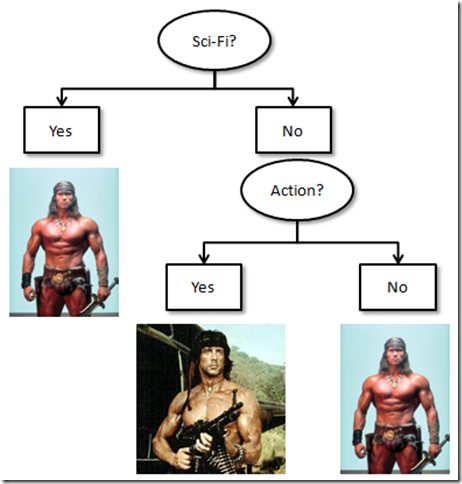
That’s a Decision Tree in a nutshell: we traverse a Tree, asking about features, and depending on the answer, we draw a conclusion or recurse deeper into more questions. The goal today is to let the computer build the right tree from the dataset, and use that tree to classify “subjects”.
More...
01 Aug 2012
Machine Learning in Action, in F#
Porting Machine Learning in Action from Python to F#
This is the continuation of this post, where I began exploring k-nearest-neighbor classification, a Machine Learning algorithm used to classify items in different categories, based on an existing sample of items that have been properly classified.
Disclaimer: I am new to Machine Learning, and claim no expertise on the topic. I am currently reading Machine Learning in Action, and thought it would be a good learning exercise to convert the book’s samples from Python to F#.
To determine what category an item belongs to, the algorithm measures its distance from each element of the known dataset, and takes a “majority vote” to determine its category, based on its k nearest neighbors.
In our last installment, we wrote a simple classification function, which was doing just that. Today, we’ll continue along Chapter 2, applying our algorithm to real data, and dealing with data normalization.
The dataset: Elections 2008
Rather than use the data sample from the book, I figured it would be more fun to create my own data set. The problem we…ll look into is whether we can predict whether a state voted Republican or Democrat in the 2008 presidential election. Our dataset will consist of the following: the Latitude and Longitude of the State, and its Population. A State is classified as Democrat if the number of votes (i.e. popular vote) recorded for Obama was greater than McCain.
More...
29 Jul 2012
Machine Learning in Action, in F#
Porting Machine Learning in Action from Python to F#
With all sorts of people waving around the term “Machine Learning” lately, I figured it was time to look into what the fuss was about, so I purchased “Machine Learning In Action”. I am mostly enjoying the book so far, with one inconvenience: all the code presented is in Python, which is easy enough to follow, but not directly useful to me. The best way to learn is to get your hands dirty and code, so I am planning on converting the Python examples into F# as a progress through - which should also be a good exercise in learning more F#.
Chapter 2 of the book covers classification using k-Nearest Neighbors. The idea behind the algorithm is fairly straightforward: given a dataset of numeric observations, each observation being classified in a group, the algorithm will classify a new observation based on what group most of its close neighbors belong to.
The book uses a linear algebra library in its implementation. It seemed like overkill for the situation, so I’ll go for raw F# here.
Let’s first create a new F# library project, and start working on a script, creating a fictional dataset like this:
let createDataSet =
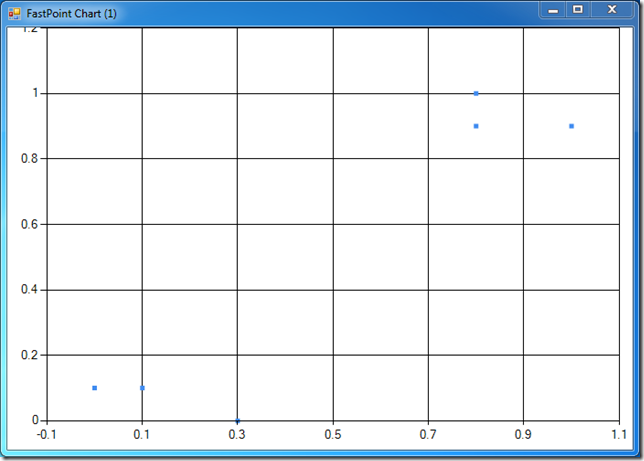
    [| [| 1.0; 0.9 |]
       [| 0.8; 1.0 |]
       [| 0.8; 0.9 |]
       [| 0.0; 0.1 |]
       [| 0.3; 0.0 |]
       [| 0.1; 0.1 |] |],
    [| "A"; "A"; "A"; "B"; "B"; "B" |]
createDataSet returns a Tuple with two elements. First, we create an Array of Arrays, an Array containing 6 observations on 2 fictional variables. The second element is also an Array, containing the Label of the group the observation belongs to. For instance, the first observation was [ 1.0; 0.9 ], and it belonged to group A.
It would be helpful to visualize the dataset, to get a sense for the structure of the data. One option to do this is FSharpChart, a lightweight charting library which works fairly well with the F# interactive window. The easiest way to use it is by adding it to our project via NuGet, which adds a reference to MSDN.FSharpChart. We need to add a reference to FSharpChart to the script, with a reference to the path where NuGet downloaded the libraries (this post by Don Syme provides a great example) - we are now ready to add a scatterplot function to the script:
#r @"C:\Users\Mathias\Documents\Visual Studio 2010\Projects\MachineLearningInAction\packages\MSDN.FSharpChart.dll.0.60\lib\MSDN.FSharpChart.dll"

open MSDN.FSharp.Charting

let createDataSet =
    [| [| 1.0; 0.9 |]
       [| 0.8; 1.0 |]
       [| 0.8; 0.9 |]
       [| 0.0; 0.1 |]
       [| 0.3; 0.0 |]
       [| 0.1; 0.1 |] |],
    [| "A"; "A"; "A"; "B"; "B"; "B" |]

let scatterplot (dataset: float[][]) =
    dataset
    |> Array.map (fun e -> e.[0], e.[1])
    |> FSharpChart.FastPoint
    |> FSharpChart.Create
The scatterplot simply takes a dataset, maps each observation to a tuple of X and Y coordinates, and passes it to FSharpChart.FastPoint, which produces a… scatterplot. Let’s select all that code, send it to F# interactive, and start playing in fsi:
> let data, labels = createDataSet
scatterplot data;;

val labels : string [] = [|"A"; "A"; "A"; "B"; "B"; "B"|]
val data : float [] [] =
  [|[|1.0; 0.9|]; [|0.8; 1.0|]; [|0.8; 0.9|]; [|0.0; 0.1|]; [|0.3; 0.0|];
    [|0.1; 0.1|]|]
At that point, you should see a chart popping up, looking like this one:
More...
23 Jul 2012
Nothing fancy this week – just thought I would share some of what I learnt recently playing with the Reactive Extensions and F#.
Here is the context: my current week-ends project, Bumblebee, is a Solver, which, given a Problem to solve, will search for solutions, and fire an event every time an improvement is found. I am currently working on using in in Azure, to hopefully scale out and tackle problems of a larger scale than what I can achieve on a single local machine. One problem I ran into, though, is that if multiple worker roles begin firing events every time a solution is found, the system will likely grind to a halt trying to cope with a gazillion messages (not to mention a potentially unpleasantly high bill), whereas I really don’t care about every single solution – I care about being notified about some improvements, not necessarily every single one. What I want is an ability to “throttle” the flow of events coming from my solver, to receive, say, the best one every 30 seconds.
For illustration purposes, here is a highly simplified version of the Bumblebee solver:
type Generator() =

    let intFound = new Event<int>()
    member this.IntFound = intFound.Publish

    member this.Start() =
        Task.Factory.StartNew(fun () ->
            printfn "Searching for numbers..."
            for i in 0 .. 100 do
                intFound.Trigger(i)
                Thread.Sleep(500)
            ) |> ignore