As happy as I am with how Bumblebee came out so far, there was one sore spot bugging me. I tried my best to write it in a functional style, but failed in one place. The inner part of the Search algorithm, which processes bees coming back in the queue with a new solution, was written as a while loop, using two mutable references to maintain the best solution found so far, and the list of solutions stored by the inactive bees.
I am putting together a demo VSTO add-in for my talk at the Excel Developer Conference. I wanted to play with charts a bit, and given that I am working off a .NET model, I figured it would be interesting to produce charts directly from the data, bypassing the step of putting data in a worksheet altogether.
In order to do that, we simply need to create a Chart in a workbook, add a Series to the SeriesCollection of the chart, and directly set the SeriesValues and XValues as an array, along these lines:
Given a group of n items, each with a distinct value V(i), what is the best way to divide the items into 3 groups so the group with the highest value is minimized? Give the value of this largest group.
This looks like one of these combinatorial problems where a deterministic algorithm exists, and will be guaranteed to identify the optimal solution, with the small caveat that larger problem may take an extremely long time to resolve.
Note that as ccoakley points out in his comment to the StackOverflow question, there is no reason for a greedy approach to produce the optimal answer.*
I figured this would be a good test for Bumblebee, my Artificial Bee Colony algorithm, which can produce a good solution in reasonable time, at the cost of not being guaranteed to find the actual optimum solution. While we are at it, I figured we could also relax the constraints, and break the group into an arbitrary number of groups, and have possible duplicates rather than unique values.
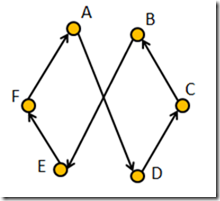
Last week I posted some screen captures of Bumblebee in action on the Traveling Salesman Problem. One thing was bugging me, though – the algorithm didn’t seem to handle crossings very well. I ended up adding a de-crossing routing, which ended up speeding up the process quite a bit. The full C# demo, illustrating how to use Bumblebee from C#, has been pushed as version 0.2 to CodePlex.
Below is an illustration of the algorithm in action, in a nice seasonal color scheme. Santa needs to travel through 200 random cities: starting from a terrible initial route, the algorithm progressively disentangles them and ends up with a pretty good-looking solution under 2 minutes, significantly reducing the carbon footprint of those reindeers:
TSP with 200 cities running for 2 minutes
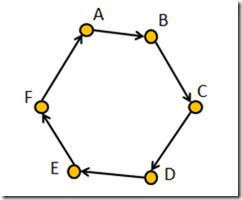
So what was the issue with line crossings? Consider the following route, in perfect order:
Now imagine that while searching, the algorithm discovers the following path:
I spent some time this week putting together an example illustrating how to use Bumblebee from C# code. I figured it would be more exciting to have a graphical representation of the bee colony working on the traveling salesman problem, so I put together a small WPF application which creates a random set of cities, and displays the improvements live as they are found by the algorithm.
Here is a screen capture of the first 10 seconds of a 100-cities problem:
Bumblebee working on 100 cities
The source code for the example is available in the current head revision, under the TspDemo.CSharp project; I’ll push an “official” downloadable version as soon as I have time for some cleanup. Note that, besides a reference to Bumblebee, a reference to FSharp.Core 4.0 is required - the rest is all pure C#.