05 Apr 2010
A few weeks back, Michael asked an interesting question in a comment: how do you go about unit testing a VSTO project? One of the reasons I prefer working with VSTO over VBA, is that it makes it possible to write automated tests. What I realized with this question, though, is that I unit test heavily the .Net functionality of my add-ins, but not much (if at all) the interaction with Excel.
Note: I am aware of the existence of a VBA unit testing solution, xlUnit; I found the project conceptually pretty cool, but from a practical standpoint, it doesn’t seem nearly as convenient as NUnit or the other established frameworks, which isn’t much of a surprise, given the maturity of unit testing in the .Net world.
The reason for this is double. First, most of my VSTO projects focus on generating heavy computation outside of Excel, and writing results to Excel; as a result, the meat of the logic has little to do with Excel, and there isn’t all that much to test there.
Then, testing against VSTO is a bit of a pain. By definition, a VSTO project comes attached with a giant external dependency to Excel, which we have limited control over, and which is also rather unpleasant to deal with from .Net. To illustrate one aspect of the issue, let’s consider this code snippet:
[TestFixture]
public class TestsThisAddIn
{
   [Test]
   public void WeCannotInstantiateTheAddInProperly()
   {
      var addIn = new ThisAddIn();
      var excel = addIn.Application;
      Assert.IsNotNull(excel);
   }
}
This test will fail: if we instantiate the add-in directly, it does not automatically hook up to Excel. The VSTO add-in is started up by Excel itself, and we cannot replicate that simply in our test code, and access the Excel object to verify that things behave as expected.
So how could we approach the problem? Unit testing our code means that we want to validate that pieces under our control (classes we wrote) work properly; the challenge is that some of them interact with Excel. We are not concerned with testing the system in its entirety (add-in code + Excel) here, which is an important issue, but not a unit-testing one.
The words “unit test” and “external dependency” together suggest one technique – Mocking. In a nutshell, Mocking consists of replacing the external dependency with a fake, an object which behaves the same way as the “real thing”, but is easier to work with.
There are three ways our classes can interact with Excel that I can think of:
- react to Excel events
- read/query from Excel
- write/command to Excel
More...
01 Apr 2010
My step-by-step Excel 2007 VSTO add-in tutorial has been growing quite a bit, and Dennis Wallentin, in his great wisdom, suggested that a table of contents would be a useful addition. Here it is - I will update this page as I keep adding to the tutorial.
Excel VSTO Add-In Series
More...
27 Mar 2010
Excel VSTO Add-In Series
Today is the day, we will finally close “chapter one” of these series, with some minor improvements of the tree view display of open workbooks and worksheets. The final result of our work looks like this, with a TreeView displaying all open workbooks and worksheets, refreshing its contents (quasi) automatically, and with some home-made icons just for kicks.
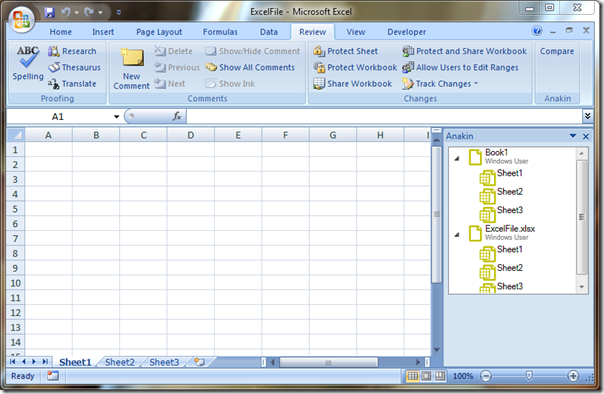
Rather than a systematic walk-through, I will just explain the changes I implemented to the code base, which I have now posted on a dedicated Wiki page.
Download Anakin project code
More...
21 Mar 2010
Finally performed the upgrade to BlogEngine 1.6.0. I apologize to my readers who may have experienced outages - the process wasn’t quite as smooth as for the previous versions, in part due to the documentation, which was less thorough than usual. Thanks to David Wynne for his step-by-step walkthrough which came in very handy. I would also have appreciated if somewhere, it was mentioned that the database schema had been slightly modified…
More...
17 Mar 2010
Excel VSTO Add-In Series
It’s time to wrap-up the first part of this tutorial, and hook up our tree view to Excel events, to update the contents of the tree when the user changes what is open.
We need to capture the following: we need to update the TreeView when the user
- Opens, creates or closes a workbook
- Adds or deletes a worksheet
Added Worksheets and Workbooks
Let’s start with adding a worksheet to a workbook. Excel exposes that event, through the Workbook.NewSheet event. We want the WorkbookViewModel to take care of his children, so we modify the constructor the following way:
internal WorkbookViewModel(Excel.Workbook workbook)
{
   this.workbook = workbook;
   workbook.NewSheet += new Excel.WorkbookEvents_NewSheetEventHandler(workbook_NewSheet);
   // no change here, code stays the same
}

void workbook_NewSheet(object newSheet)
{
   var worksheet = newSheet as Excel.Worksheet;
   if (worksheet != null)
   {
      var worksheetViewModel = new WorksheetViewModel(worksheet);
      this.worksheetViewModels.Add(worksheetViewModel);
   }
}
Creating event handlers can be a bit tedious; fortunately, Visual Studio simplifies the task quite a bit. When you type workbook.NewSheet +=, you should see a tooltip appear, which “suggests” an event handler. Type Tab, and Tab again – Visual Studio will create for you the empty event handler, with the right arguments and types, where you can now insert the logic of what should happen when the event is triggered.
More...