17 Feb 2010
Excel VSTO Add-In Series
Now that we have created the VSTO add-in project, it’s time to add some functionality to it. We want to provide a user interface to select what sheets we want to compare, and navigate between the differences that the add-in has found. In order to do this, we will create a custom task pane.
You can think of a custom task pane as a placeholder for controls. The best way to illustrate the concept is to simply do it. In our project, we will add a folder “TaskPane”, and add a new User Control by right-clicking on the TaskPane folder, which we will name “TaskPaneView”.
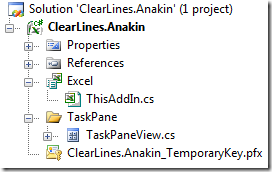
If you double-click on TaskPaneView, visual studio will display a gray empty area. This is the “canvas” on which we will add controls later, to allow the user to call the operations our add-in will expose. For now, we’ll leave it at that, and just focus on displaying the task pane.
Now go to the ThisAddIn class, and add the following code in the startup method:
private void ThisAddIn_Startup(object sender, System.EventArgs e)
{
    var taskPaneView = new TaskPaneView();
    var myTaskPane = this.CustomTaskPanes.Add(taskPaneView, "Anakin");
    myTaskPane.Visible = true;
}
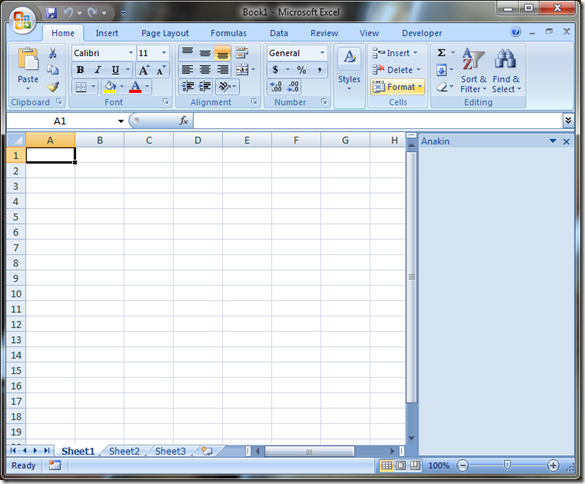
Hit F5 to debug, and you should see the following:
More...
12 Feb 2010
Excel VSTO Add-In Series
In the recent past, I have been developing solutions for clients using VSTO – Visual Studio Tools for Office – and I believe that VSTO is a technology which has a lot to offer. I used to write a lot of VBA code to automate Excel, but after spending the past 5 years or so writing C# code using .Net, I find VBA limiting, and the development environment extremely frustrating. So when I saw that Jon Peltier had begun a tutorial series on how to build a classic Excel add-in, I thought, why not do the same with VSTO?
My baseline objective will be to write an add-in which tracks the differences between two open worksheets, and allows the user to merge some of the contents, if appropriate.
As a secondary objective, I will try to showcase some of the benefits of using VSTO over VBA; for that reason, the add-in will be built for Excel 2007, and use the Ribbon, and .Net 3.5, so that we can use some WPF controls. I will do my best to highlight some of the differences between VBA and C# along the path, as well as highlight some important aspects of the Excel object model. As a result, some places will probably seem slow to the experienced .Net developer, and some others to the VBA veteran.
Unlike Jon, I have not written my add-in yet; I will share the successes and struggles as I progress along. The main tasks/areas we will have to cover are
- hooking the add-in to the Excel user interface,
- accessing the Excel objects through the add-in,
- creating custom controls to select sheets,
- identifying differences between worksheets,
- listening to Excel events,
- deploying the add-in.
I will likely dig into Excel 2010, .Net 4.0 and Visual Studio 2010 along the path, but given that Office 2007 hasn’t been adopted by all yet, this will not be my initial focus.
More...
06 Feb 2010
I am currently working on a project which extends an Excel VSTO add-in model I had developed a few months back. This is a joint project, and my add-in has to interact with a classic Excel worksheet model, which got me worried. The original model read data from Excel into a C# object, which handles the heavy-duty computation, and writes back results to a spreadsheet once it is done. The modified model has to proceed in 2 steps: perform a partial read of the inputs, compute some outputs, feed them into the worksheet model, read some results from that worksheet, resume computations and write out the final outputs.
The reason I was worried is that the spreadsheet I have to interact with is a bit slow, and I was concerned about a race condition type of problem. What if the add-in attempted to read data from the worksheet, before Excel had time to update the values in the worksheet?
In order to check whether there was a problem, I created a small test case. I first wrote a VBA function which was on purpose very slow:
Public Function SlowFunction(arg As String) As String

    WaitFor 10
    SlowFunction = arg

End Function

Public Function WaitFor(seconds As Integer)

    Dim startTime As Double
    startTime = timer

    Do While timer < startTime + seconds
    Loop

End Function
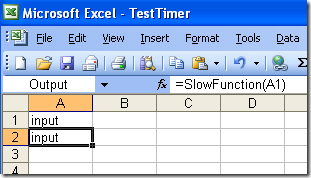
The SlowFunction simply takes a string as input, calls the WaitFor function, which stays busy for a few seconds, and returns the input string after 10 seconds have elapsed. This allowed me to artificially create an extremely inefficient worksheet: when the input cell A1 is modified, the output cell A2 is updated only 10 seconds later.
More...
03 Feb 2010
Activating a worksheet is a fairly common task in Office automation; however, in a VSTO project, if you call:
… building the project will give you the following warning:
Ambiguity between method ‘Microsoft.Office.Interop.Excel._Worksheet.Activate()’ and non-method ‘Microsoft.Office.Interop.Excel.DocEvents_Event.Activate’. Using method group.
I don’t like to have warnings in my projects when I can avoid it, but I never got to look into it. After all, it was “just a warning”, so I let it go.
The answer came to me via the Carter & Lippert VSTO book (aka “The Brick”), which I finally started reading through, and highly recommend. The gist of it is that the Worksheet interface implements 2 interfaces, _Worksheet and DocEvents_Event. _Worksheet contains the properties and methods that correspond to the Worksheet, including the Activate() method, while DocEvents_Event owns the events, including Activate, and these two names collide.
To disambiguate the call, you just need to cast the Workbook to the appropriate interface, the one which owns the method you are interested in. In my case, I want to Activate the workbook, and therefore use the following code:
((Excel._Worksheet)myWorksheet).Activate();
And sure enough, the warning is gone.
More...
31 Jan 2010
I have grown a bit frustrated by the difficulty to gather information about local .Net development community events. Of all people, I am one of the best-positioned to hear about these events, because of my involvement with the San Francisco .Net user group, and yet, I routinely discover that I missed an event, because there is no clear place to go to get that information and I never heard about it.
So here we go - ladies and gentlemen, introducing NorCalWeekly.Net, your weekly serving of .Net events in north California! My goal will be to provide in one place, on a weekly basis, announcements for all upcoming .Net events in the area - so if you know of anything relevant taking place, please let me know! The design and features are somewhat minimalist for the moment, I’ll improve it over time.
More...