06 Oct 2009
Silicon Valley Code Camp version 4.0 took place this week-end, and was a big success, judging by the numbers and the happy faces. Congratulations to Peter Kellner and the team for a tremendous organization!
Personally, I wanted to give a big thank-you to the people who attended my session on Test-Driven Development – and for bearing with my voice, which was pretty shaky. I got sick this week and wasn’t sure until Saturday evening if I could do it, because on Thursday my voice was totally gone. I think I had more herbal tea with honey this week than in my entire life, but you guys made it all worth it: I had a great time giving my presentation, and you guys rocked! As I said during the session, the theory behind TDD is pretty succinct, so there isn’t much in the slides themselves worth posting. Instead, I thought I would list a few pointers:
NUnit: you can find it here. I recommend checking out the Quick Start page, which covers most of what you need to start writing unit tests. I have written a post on data-driven tests here.
While we are talking about tools, I haven’t presented it during the session, but I really like TestDriven.Net. There is a free community version for your personal use. It’s a Visual Studio add-on which allows you to run and debug your tests from Visual Studio.
Even though it’s a Java book, and this session was for .NET developers, I really recommend Kent Beck’s book Test-Driven Development by Example. It’s very easy to read, and will get you started on the right foot. It’s also very well written – one of my favorite books!
The other book I recommend is the Art of Unit Testing, by Roy Osherove. I just finished it, and I wish I had it with me a few years ago, when I began writing tests seriously :) The book is technically about unit testing and not TDD, and it is a .NET book. I highly recommend it, it is chock-full of good advice, and covers way more than just testing. That’s it! If you are interested in either the slides or code, let me know, and I’ll gladly post them, too. In the meanwhile, thanks again for coming, and… happy testing!
More...
03 Oct 2009
The current version of Akin, my free Excel worksheet comparison application, has been out for a bit now, and people have sent me some interested suggestions on how to make it better. However, my biggest personal issue so far has been speed. Opening large file hasn’t been an issue, but displaying comparisons of large worksheets (say, 200 x 200 cells) was taking a long time. The typical user for Akin is likely to be working with large files (tracking differences wouldn’t be an issue otherwise), so I had to do something about it.
I have bitten the bullet – I changed the design, and completely re-wrote the user interface where the comparison is displayed, and I hope that you will be pleased with the performance improvement. Where a 200 x 200 cells comparison took over 20 seconds to display, a 500 x 500 cells comparison is now virtually instantaneous. While I was at it, I did some cosmetic improvements on the looks as well.
You can download the new version here. Now that this performance problem is out of the way, I can get back to implementing the features that have been suggested so far. Stay tuned!
More...
29 Sep 2009
I had an Eureka moment today, and realized that I was trying hard to resolve the wrong problem, when what was needed was a change of frame.
I have been developing an application which tracks differences between Excel worksheets, and displays them in a layout similar to Excel itself. The user can navigate through the sheet on display by using two scrollbars, just like he would with Excel. To achieve this, my approach so far has been to read the data, create a grid using WPF, adding one cell control to the grid for each cell in the spreadsheet, and navigate “over” that grid using the scroll bars.
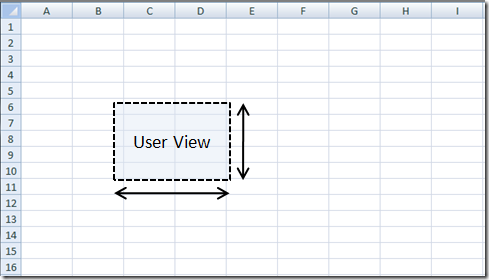
This approach works well as long as the spreadsheet is small, but for larger sheets – say, 200 x 200 cells - the time needed to create the cells and add them to the grid was getting pretty long, so I focused my attention on figuring out a way to populate the grid faster, without much success.
Then yesterday, someone wrote this on StackOverflow:
I’m going to go out on a limb here and say that trying to add 40,000 controls is your real bottleneck; not so much as to how you’re adding the controls.
Indeed – that’s completely correct.This didn’t answer my issue directly, but it has been liberating, and got me to rethink the question from a different angle – do I really need 40,000 cells?
More...
20 Sep 2009
I was recently inspired by an article in OR/MS mag to write 2 posts on using Excel data tables to resolve optimization problems. As it turns out, these puzzles are not only published in the magazine: they also have their online home at Puzzlor.com. So if you like optimization and math problems in general, and like puzzles, check it out!
More...
18 Sep 2009

I found a bug in my code the other day. It happens to everybody - apparently I am not the only one to write bugs – but the bug itself surprised me. In my experience, once you know a piece of code is buggy, it’s usually not too difficult to figure out what the origin of the problem might be (fixing it might). This bug surprised me, because I knew exactly the 10 lines of code where it was taking place, and yet I had no idea what was going on – I just couldn’t see the bug, even though it was floating in plain sight (hint: the pun is intended). Here is the context. The code reads a double and converts it into a year and a quarter, based on the following convention: the input is of the form yyyy.q, for instance, 2010.2 represents the second quarter of 2010. Anything after the 2nd decimal is ignored, 2010.0 is “rounded up” to 1st quarter, and 2010.5 and above rounded down to 4th quarter. Here is my original code:
public class DateConverter
{
    public static int ExtractYear(double dateAsDouble)
    {
        int year = (int)dateAsDouble;
        return year;
    }

    public static int ExtractQuarter(double dateAsDouble)
    {
        int year = ExtractYear(dateAsDouble);
        int quarter = (int)(10 * (Math.Round(dateAsDouble, 1) - (double)year));
        if (quarter < 1)
        {
            quarter = 1;
        }
        if (quarter > 4)
        {
            quarter = 4;
        }
        return quarter;
    }
}
Can you spot the bug?
More...