16 Sep 2008
Macroeconomics and public policy have never been my forte in economics, which is probably why I did not come across the Gini coefficient until now. In a nutshell, the Gini coefficient is a clever way to measure inequalities of distribution in a population.
As an illustration, imagine 4 countries, each of them with 10 inhabitants. In Equalistan, everyone owns the same amount of $100, whereas in Slaveristan, one person owns everything, and the 9 others have nothing. In between, there are Similaristan and Spreadistan.
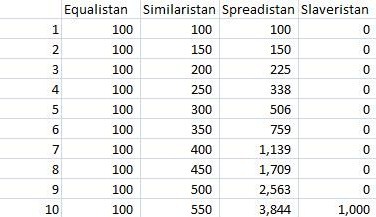
If you order the population by increasing wealth and plot out the cumulative % of the total wealth they own, you will get the so-called Lorentz curve. Equalistan and Slaveristan are the two extreme possible cases; any curve must fall between these two, and the further the curve is from Equalistan, the less equal the distribution. The Gini coefficient uses that idea, and measures the surface between the Equalistan curve and your curve; normalizing to obtain 100% for the Slaveristan case, and any population will have an index between 0% (perfectly equal) and 100% (absolutely unequal).
More...
07 Sep 2008
Yes/No/Cancel choices are a classic in creating surprisingly confusing user interfaces out of a very simple problem, but this one takes the cake, and proves that people will find ways to create confusion even in the most unlikely situation:

More...
05 Sep 2008
Edit, Sept 5, 2008: nothing incorrect in the following post; however, if I had Google’d first, I would have found that DateTime date = DateTime.FromOADate(d), where d is a double, does exactly the job…
The project I am currently working on requires reading some data from an Excel workbook into a .NET calculation engine written in C#. Most of my reads follow this pattern: read a named range into an array of objects, then convert the object to the appropriate .NET type.
public static object[,] GetRangeAsArray(Excel.Worksheet sheet, string rangeName)
{
    Excel.Range range = sheet.get_Range(rangeName, Missing.Value);
    object[,] rangeAsArray = range.Value2 as object[,];
    return rangeAsArray;
}
However, I ran into an issue reading dates. Excel stores dates as doubles, which encode the number of days elapsed since January 0, 1900 (Yes, January 0). As a result, the object stored in the array is a double, and the Convert.ToDateTime(double) method throws an InvalidCastExpression, so standard conversion doesn’t work.
If you look a bit deeper into it (here is a very comprehensive page
on the topic), you will discover some interesting idiosyncrasies of the date encoding in Excel. For instance, back in the days, the Excel team knowingly implemented a bug to replicate a known bug of Lotus, for the sake of backwards compatibility.
Here is the quick method I wrote to perform that conversion, addressing these issues:
public static DateTime ConvertToDateTime(double excelDate)
{
    if (excelDate < 1)
    {
        throw new ArgumentException("Excel dates cannot be smaller than 0.");
    }
    DateTime dateOfReference = new DateTime(1900, 1, 1);
    if (excelDate > 60d)
    {
        excelDate = excelDate - 2;
    }
    else
    {
        excelDate = excelDate - 1;
    }
    return dateOfReference.AddDays(excelDate);
}
29 Aug 2008
Update, Oct 12, 2009: if you are looking for a way to install a VSTO add-in with multiple dll, I found out there was a better solution here.
I just completed my first real-life VSTO project, and I am officially a convert: I can do everything I did in VBA, using mature languages like C#, and the comfort of the Visual Studio development tools.
Everything has not been smooth, though. I struggled quite a bit initially with deployment, a problem which just does not exist with VBA. However, after some digging, I came across this great post, which provides comprehensive step-by-step guidelines on setting up an add-in project for Office 2003.
At that point, I thought my issues were over, and I just cruised along, happily coding in C#. And then I decided that I would extract the logic of my calculation engine in a separate dll, which I would reference in my Excel add-in as a “satellite assembly” – and had a bad surprise. On my development machine, everything worked beautifully, and when I ran the installer on a clean machine, it installed my add-in without any complaint (The satellite dll was even added to the add-in folder), but somehow, the add-in did not run. No error message, no indication of a problem, but where I expected my dll to perform calculations, nothing happened.
More...
12 Aug 2008
Just plugging the next Bay.Net Education Day (which I am organizing), where Mark Michaelis will
start with a blank slate, the Visual Studio Wizard, and proceed to create a series of assemblies that comprise .NET 3.0/.NET 3.5 sample application. The result will be a whirl wind introduction to technologies such as Windows Communication Foundation (WCF), Windows Presentation Foundation (WPF), Ajax, SharePoint, Visual Studio Unit Testing, LINQ and much more. Attend this all day session to catch up with where Microsoft .NET technology is today and gain insight into where it is going tomorrow.
Should be a great event - it will take place Saturday September 6, at Foothill College; you can register here.
More...