11 Dec 2011
Yesterday, I made the first version of Bumblee public on Codeplex. Version 0.1 is an Alpha release, meaning that it’s usable, but still rough around the edges.
What is Bumblebee? It is an Artificial Bee Colony (ABC) algorithm, a randomized search method which mimics the behavior of bee hives. Given a search problem, the algorithm will dispatch Scout bees to look for new solutions, and Active bees to explore around known solutions. Once their search is complete, bees return to the Hive and share information with Inactive bees, and new searches are allocated based on the information available so far.
I have multiple goals with Bumblebee. I came across the algorithm for the first time in this article, which illustrates it on the Traveling Salesman Problem with a C# implementation. I enjoyed the article, but wondered if I could
- parallelize the algorithm to use multiple cores,
- provide a general API to run arbitrary problems.
… and I figured it would be a good sample project to sharpen my F# skills.
For the parallelization part, I decided to use the Task Parallel Library: the Hive creates Tasks for each bee beginning a search, which returns to a Queue to be processed and share the search result with the inactive bees in the Hive (see outline here.
Deciding on a design for the API took some back and forth, and will likely evolve in the next release.
The API should:
- accommodate any problem that can be solved by that approach,
- be reasonably simple to use by default,
- limit parallelization problems, in particular around random numbers generation,
- be palatable for F# and C# users.
Regarding the first point, 3 things are needed to solve a problem using ABC: Scouts need to know how to find new random solutions, Active bees need to be able to find a random neighbor of a solution, and solutions need to be comparable. I figured this could be expressed via 3 functions, held together in a Problem class:
- a generator, which given a RNG returns a new random solution,
- a mutator, which given a RNG + solution tuple, returns a random neighbor of the solution,
- an evaluator, which given a solution returns a float, measuring the quality of the solution.
You can see the algorithm in action in the TspDemo console application included in the source code.
I opted to have the Random Number Generator as an argument because the algorithm is responsible for spawning Tasks, and is therefore in a good position to provide a RNG that is safe to use, relieving the client of the responsibility of creating RNGs. I’ll probably rework this a bit, though, because I don’t like the direct dependency on Random; it is not very safe, and I would like to provide the ability to use whatever RNG users may happen to prefer.
The reason I chose to have the evaluator return a float (instead of using IComparable) is because I figured it might be interesting to have a measure which allowed the computation of rates of improvements in solution quality.
As for simplicity, I ended up with a main class Solver with 2 main methods. Search(Problem) initiates a search as a Task, and goes on forever until Stop( ) is called. The Solver exposes an event, FoundSolution, which fires every time an improvement is found, and returns a SolutionMessage, containing the solution, its quality, and the time of discovery. It is the responsibility of the user to decide when to stop the search, based on the information returned via the events.
By default, the Solver is configured with “reasonable” parameters, but if needed, they are exposed via properties, which can be modified before the search is initiated.
No effort has gone for the first release to make this C# friendly – this, and abstracting the RNG, are the goals of the next release.
I would love to get feedback, both on the overall design and the code itself! You can download the project from here.
More...
04 Dec 2011
I am in the middle of “Working Effectively with Legacy Code”, and found it every bit as great as it was said to be. In the book, Feathers introduces the concept of Seams and Enabling Points:
a Seam is a place where you can alter behavior in your program without editing it in that place
every seam has an enabling point, a place where you can make the decision to use one behavior or another.
The idea - as I understand it - is that an enabling point is a hook for testability, a place where you can replace the behavior of a piece of code with your own controlled behavior, and validate that the results are as expected.
The reason I am bringing this up is that I have been writing lots of F# lately, and it made me realize that a functional style provides lots of enabling points, and can be much easier to test than object-oriented code.
Here is a simplified, but representative, example of the problem I was looking at: I needed to pick a random item in a list. In C#, a method along these lines would do the job:
public T PickFrom(IList<T> list)
{
   var random = new Random();
   return list[random.Next(list.Count())];
}
However, this code is utterly untestable; it’s also probably a terrible idea to instantiate a new Random every time this is called, so we modify it this way:
public T PickFrom(IList<T> list, Random random)
{
   return list[random.Next(list.Count())];
}
This is much better: now we have a decent Enabling Point, because the list of arguments of the method contains everything that is used inside the method. However, this is still untestable, but for a different reason: by definition, Random.Next() will return different values every time PickFrom is called, and expecting a repeatable result from PickFrom is a bit of a desperate enterprise.
More...
27 Nov 2011
Earlier this month, on Simon Murphy’s blog, the project to organize a UK Excel Developer conference 2012 in London quickly took shape. As of now, the planned date is in the January 24 to 26 range, with a pretty cool agenda, covering most of the recent developments Excel developers should know about. I am looking forward to it!
I’ll be talking for about an hour on VSTO (Visual Studio Tools for Office). VSTO can be both awesome and painful: I plan on demoing building an Excel add-in from the ground up, illustrating some of the benefits and drawbacks/pitfalls of that approach, so that you know when it’s the right time to go that route.
If there are any topics or questions you are specifically interested in, please let me know in the comments – I’ll be happy to take requests.
As an aside, I usually talk at .NET developers events, where I need to convince the audience that developing for Excel (or Office) isn’t a terrible idea. This will be my first time with an Excel developers audience, and I expect the opposite challenge, namely why bother with C#/VB.NET and Visual Studio when VBA is free and works just fine?
Check out the Excel Conference page and Simon’s blog for updates.

Picture from the amazing series “The Kitten Covers
More...
13 Nov 2011
We were doing some pair-programming with Petar recently, Test-Driven Development style, and started talking about how figuring out where to begin with the tests is often the hardest part. Petar noticed that when writing a test, I was typically starting at the end, first writing an Assert, and then coding my way backwards in the test – and that it helped getting things started.
I hadn’t realized I was doing it, and suspected it was coming from Kent Beck’s “Test-Driven Development, by Example”. Sure enough, the Patterns section of the book lists the following:
Assert First. When should you write the asserts? Try writing them first.
So why would this be a good idea?
I think the reason it works well, is that it helps focus the effort on one single goal at a time, and requires clarifying what that goal is. Starting with the Assert forces you to imagine one single fact that should be true once you have implemented the feature, and to think about how you are going to verify that the feature is indeed working.
Once the Assert is in place, you can now write the story backwards: what is the method that was called to get the result being checked, and where does it belong? What classes and setup is required to make that method call? And, now that the story is written, what is it really saying, and what should the test method name be?
In other words, begin with the Assert, figure out the Act part, Arrange the actors, and (re)name the test method.
I think what trips some people is that while a good test will look like a little story, progressing from a beginning to a logical end, the process leading to it follows a completely opposite direction. Kent Beck points the Self-Similarity in the entire process: write stories which describe what the application will do once done, write tests which describe what the feature does once the code is implemented, and write asserts which will pass once the test is complete. Always start with the end in mind, and do exactly what it takes to achieve your goal.

More...
06 Nov 2011
I am somewhat tests-obsessed, and as a result, often find Excel frustrating to work with, because writing automated tests against it isn’t trivial. So recently, while perusing the chapter on Scripting in Programming F#, I came across an Office automation example, and started wondering whether this would be a practical way to write automated tests against Excel.
The use case I have in mind is an existing Excel Workbook, which contains a model (say, your typical Financial model), with a fixed structure, and maybe a sprinkle of VBA, and no .NET.
For illustration purposes, let’s work with the following: our workbook, Model.xlsx, contains one worksheet, “Finances”, with a Profit cell in B3, computed as the difference between the revenue and cost named cells. Pretty impressive stuff.
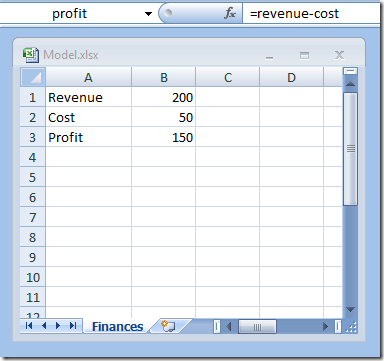
What I want is a way to automatically set the Revenue and Cost to some arbitrary value, and check that the result in Profit is what it should be – so that I don’t have to do it myself by hand, and don’t have to remember how this Workbook was supposed to work later on.
Here is how this could look like in a F# script – create a Script file, say WorkbookTest.fsx, with the following code inside:
#r "Microsoft.Office.Interop.Excel"

open System
open Microsoft.Office.Interop.Excel

Console.WriteLine("Press [Enter] to start")
Console.ReadLine()

let excel = new ApplicationClass(Visible=false)
let workbooks = excel.Workbooks

let workbookPath = @"C:\Users\Mathias\Desktop\Model.xlsx"

let workbook = workbooks.Open(workbookPath)
let worksheets = workbook.Worksheets
let sheet = worksheets.["Finances"]
let worksheet = sheet :?> Worksheet

let revenueCell = worksheet.Range "Revenue"
revenueCell.Value2 <- 100

let costCell = worksheet.Range "Cost"
costCell.Value2 <- 10

let profitCell = worksheet.Range "Profit"
let profit = profitCell.Value2

Console.WriteLine("Check profit calculations")
Console.WriteLine("Expected: {0}, Actual {1}", 90, profit)

workbook.Close(false, false, Type.Missing)
excel.Quit()

Console.WriteLine("Done, press [Enter] to close")
Console.ReadLine()
The script launches Excel in Invisible mode, opens the workbook, sets the Revenue and Cost to 100 and 10, retrieves the value from Profit, printouts the value it found as well as the expected value – and closes back the Workbook without saving any of the changes.
The nice thing here is that I can now drop that file on my desktop, and simply right-click and select “Run with F# Interactive” to execute it, without building anything, and I’ll see something like this happen:
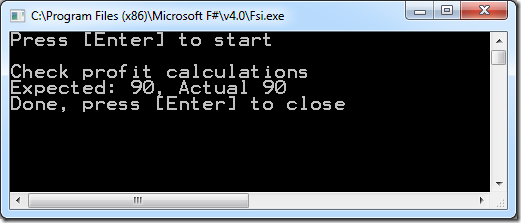
Nothing earth shattering, but still pretty nice: now I got a script which I can run anytime I want, to check whether the Workbook is behaving properly. Furthermore, what’s nice is that I don’t need to open Visual Studio to work with it: I can simply open WorkbookTest.fsx with Notepad, edit my code, and run it again.
There are some clear issues with the code in its current form. For instance, if anything goes wrong in the code (say, for instance, that I mis-typed a name which doesn’t exist with the workbook), the script will crash miserably, and let the hidden Excel instance hang in the background, waiting for someone to kill it manually. This would require some work to make sure that if exceptions are raised, everything is properly disposed, and no matter what, the file gets closed without saving any modification.
In any case, I thought it was worth sharing, even in its rough state – if only because it was fun, and also because the F# code looks surprisingly more appealing than the usual C# Interop code. Now the fun part would be to turn this into a decent testing framework for Excel…
More...