11 Sep 2011
The project I am currently working on involves developing a forecasting model. Starting from an initial estimate, the model will progressively update its forecast as time goes by and real data becomes available.
The process of developing such a model is iterative by nature: you design the mechanics of a forecasting algorithm, look at how it would have performed on historical data, fine-tune the design and parameters based on the results, and rinse & repeat.
The problem I started running into is the “look at how it would have performed on historical data”. There is plenty of data available, which is both a blessing and a curse. A blessing, because more data means better validation. A curse, because as the amount of data increases, it becomes difficult to navigate through it, and focus on individual cases.
So far, my approach has been to create metrics of fit between a model and a set of data, and to run a model against large sets of data, measuring how well the model is doing against the data set. However, I still don’t have a good solution for digging into why a particular case is not working so well. What I would like to achieve is to identify a problematic case, and explore what is going on, ideally by generating charts on the fly to visualize what is happening. Unfortunately, the tools I am using currently do not accommodate that scenario well. Excel is great at producing charts in a flexible manner, but my model is .NET code, and I don’t have a convenient, lightweight way to use C# code in Excel. Conversely, creating exploratory charts from C# is somewhat expensive, and requires a lengthy cycle: write code for the chart, compile (and lose whatever is loaded in memory), observe – and repeat.
I am currently exploring an alternative, via F# and FSharpChart. F# offers a very interesting possibility over C#, F# Interactive (fsi). Fsi is a REPL (Read, Evaluate, Print Loop), which allows you to type in code interactively in the console and execute it as you go. The beauty of it is that you can experiment with code live, without having to go through the code change / recompile cycle. Add to the mix FSharpChart, a library/script which wraps .NET DataVisualization.Charting and makes it conveniently usable from F#, and you get a nice way to write .NET code and generate charts, on the fly.
Let’s illustrate on a simple example. Suppose I have a model that simulates sales following a Poisson process, and want to check whether this “looks right”. First, let’s download FSharpChart, create a folder called “Explore” on the Desktop, and copy the FSharpChart.fsx script file into that folder. Then, let’s create an empty text file called Explore.fsx in the same folder, which we will use to experiment with code and charts, and save whatever snippets come in handy at the time.
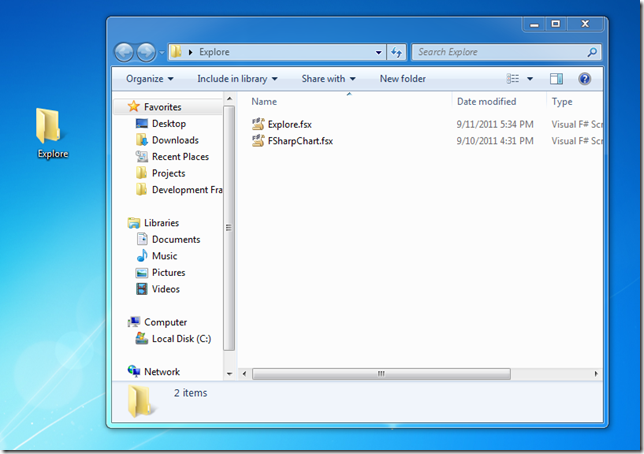
Next, let’s double-click on the Explore.fsx file, which will then be opened in Visual Studio, and type in the following:
#load @"C:\Users\Mathias\Desktop\Explore\fsharpchart.fsx"

open System
open System.Drawing
open MSDN.FSharp.Charting

let random = new Random()

// Simulate a Poisson distribution with parameter lambda
let poisson lambda =
    let L = Math.Exp(-lambda)
    let rec simulate (k,p) =
        if p > L then simulate (k + 1, p * random.NextDouble())
        else k - 1
    simulate (0, 1.0)

let sales lambda periods = [
    for i in 1.0 .. periods -> (i, poisson lambda) ]
The first line loads the FSharpChart script from the location we copied it into, making the charting capabilities available to us. The next three load up the namespaces we will need.
The poisson function is used to generate a Poisson distribution, following Knuth’s algorithm. The sales function simulates sales over a certain number of periods, assuming a rate of sales per period of lambda.
Now that we have a model, we can start playing with it. Send the whole code to the interactive window, wait for the script to load – and start typing:
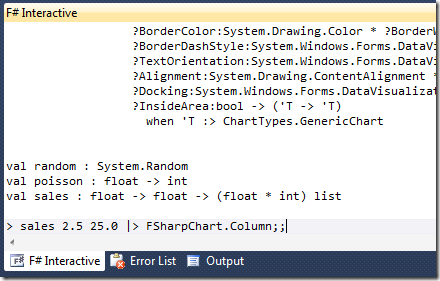
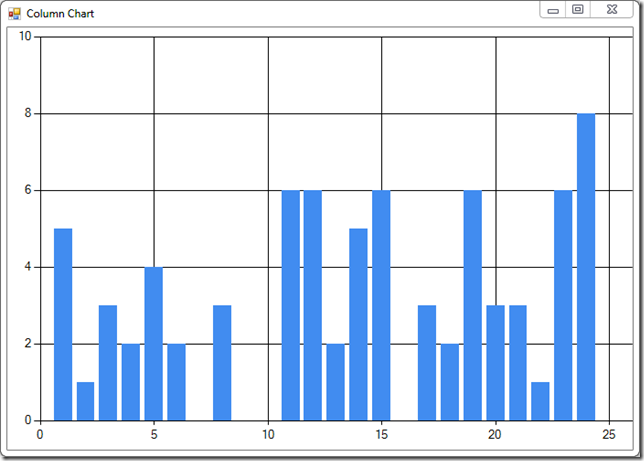
Hit Enter, here we have it – a column chart representing our simulated sales:
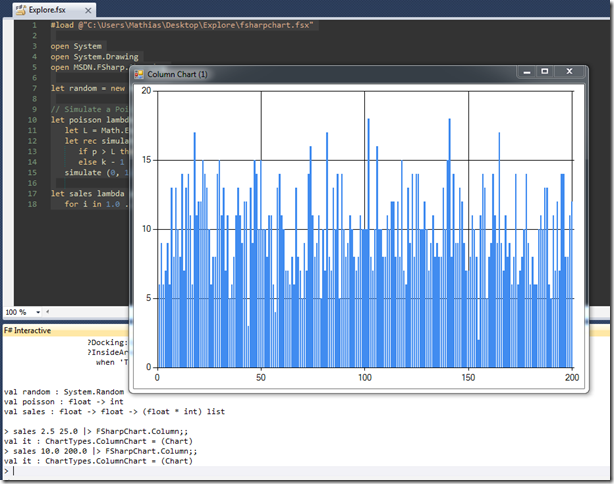
How about different values? Let’s try a lambda of 10, over 200 periods – just type in fsi, and we are set:
My experimentations are still early stage, but I am very interested in exploring this further. FSharpChart supports a ton of chart types, and gives me the ability to generate whatever I want to look at at the time, using .NET code, all from within Visual Studio. The example I went through was generating simulated data, but in principle, I should also be able to re-use existing C# code that deals with retrieving existing historical data. More on this in the next few weeks, I suspect!
Resources
You can find FSharpChart here. Carl Nolan, the author of the library, has some documentation on his blog.
Getting Started with the FSharpChart Library, which is an excerpt of “Real-World Functional Programming” (Tomas Petricek & Jon Skeet), is an excellent resource.
More...
05 Sep 2011
Back in April, inspired by an MSDN article, I began looking into converting a Simulated Bee Colony algorithms from C# to F#; I thought this would be an interesting exercise on my slow path to learning F#, and I got a rough implementation going. Attention-disorder deficit and life in general got me side-tracked, but, better late than never, I am now ready to get back to it.
One aspect I am interested in, is to figure out how the original algorithm could be modified for parallelization. In its original form, the algorithm followed a turn-based approach: given the current state of the hive, process sequentially every bee (active, inactive, and scout bees), and repeat until the pre-set number of iterations is reached.
How could we approach parallelization? At a high level, two operations are taking place:
- some bees are searching from new solutions to the problem, either by creating brand-new solutions (Scout bees), or by finding a solution close to an initial Solution (Active bees),
- bees that have completed a search come back to the Hive, and share the Solution they found to the Inactive bees via a Waggle Dance; Inactive bees can update their state based on that new information.
The first part, the Search, is easily parallelizable: while searching, a Bee shares no data with other bees. Therefore, multiple bees could be searching for new solutions, each on its own thread. On the other hand, the information sharing part is trickier: if multiple bees were to share their new solution with inactive bees at the same time, concurrency problems would likely arise.
One approach to resolve the issue is to avoid the concurrency problem, and make sure that by design, the information-sharing part is taking place sequentially, one bee at a time. Here is how we will achieve this:
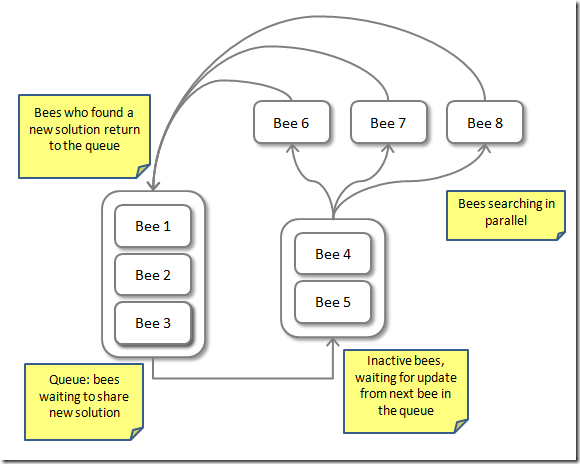
A queue will hold bees returning from a Search with a new Solution, and process bees from the queue one by one, passing their information to the current inactive bees. Once it has shared its information with the inactive bees, the bee (or one of the inactive bees) is sent to Search again in parallel – and when its search completes, it returns to the queue, where it goes back in line and wait until it can be processed.
More...
21 Aug 2011
Let’s take a last stab at our beer-delivery problem. We tried out a Sieve, we used the Microsoft Solver – time for some recursion.
How can we organize our recursion?
If we had only 1 type of beer pack, say, 7-packs, the best way to supply n bottles of beer is to supply the closest integer greater than n/7, that is,
\[\lceil {n \over 7} \rceil\]
If we had 7-packs and 13-packs, we need to consider multiple possibilities. We can select from 0 to the ceiling of n/7 7-packs, and, now that we have only one type of case pack left, apply the same calculation as previously to the remaining bottles we need to supply – and select the best of the combinations, that is, the combination of beer packs closest to the target.
If we had even more types of beer packs available, we would proceed the same way, by trying out the possible quantities for the first pack, and given the first, for the second, and so on until we reach the last type of pack – which is pretty much the outline of a recursive algorithm.
More...
14 Aug 2011
In our last post, we looked at a Sieve-like algorithm to help a Brewery find how closely they can match the number of beer bottles their thirsty customers desire, using only 7-packs and 13-packs of delicious beer; in less appetizing but more precise terms, we are trying to solve the following problem:
Suppose that you are given a list of integers, and a target integer. Your goal is to find the closest value that is greater or equal to the target, by combining integers (“packs”) from the list (only positive combinations are allowed). For instance, given 3 and 5, the closest you can get to 16 would be 5 x 2 + 3 x 2 = 16, and the closest to 17 would be 3 x 6 = 18.
The Sieve solution is pretty effective, but has some limitations. Today, we’ll take another approach: leveraging the Microsoft Solver Foundation.
The beauty of the Solver is that it allows you to focus on what you want to achieve, rather than on how to achieve it. As long as you can define clearly what your goal, your decision variables and your constraints are, you can leave it to the Solver engine to figure out what the best way to achieve that goal is, by searching the best values for the Decision variables you defined.
So what are we trying to achieve here? Our goal, in Solver terms, is to minimize the extra number of bottles shipped, under the constraint that the number of bottles shipped is greater than the requested target number. Our Decision variables are the number of units of each Beer Pack we will ship, with a constraint that Decisions must be integer (we cannot ship half-packs), and positive.
Let’s add a reference to the Solver in our project (details here), and see how this looks like in code:
More...
07 Aug 2011
In my last post, I presented a small problem which I found interesting: how to help a Brewery of the glorious land of Bizzarostan in finding the perfect combination of 7-packs and 13-packs of beer. Or, in more serious terms,
Suppose that you are given a list of integers, and a target integer. Your goal is to find the closest value that is greater or equal to the target, by combining integers (“packs”) from the list (only positive combinations are allowed). For instance, given 3 and 5, the closest you can get to 16 would be 5 x 2 + 3 x 2 = 16, and the closest to 17 would be 3 x 6 = 18.
My first take on the problem was inspired by the Sieve of Eratosthenes. The idea is to accumulate in a list all possible combinations of packs, and take the smallest combination greater than the target. The main difference with the Sieve of Erathostene is that for prime numbers, we only care about listing numbers that are multiples of primes, whereas here we need to enumerate linear combinations of packs, and not simply all the multiples of single packs.
For instance, in the example where we search for a target of 16 using a combination of 3- and 5-packs, the procedure looks like:
- Add 0 to the combinations, i.e. {0}
- Add the multiples of 3, until 17 is reached, i.e. {0, 0 + 3 x 1, 0 + 3 x 2 = 6, 9, 12, 15, 18}
- For each element of the list, create multiples of 5, and progressively add them to the list, i.e. {0, 3, 6, 9, 12, 15, 18, 0 + 5, 0 + 2 x 5, 0 + 3 x 5, 0 + 4 x 5, 3 + 5 x 1, 3 + 5 x 2, 3 + 5 x 3, 6 + 5 x 1, … }
Note that we need to accumulate all the intermediate combinations, and cannot simply store the first number greater than the limit for each pack, because we need to consider solutions which combine multiple packs – like 16 = 3 x 2 + 5 x 2
More...