23 Jan 2011
Excel Data Validation provides a nice mechanism to help users select from a set of acceptable choices, by adding a drop-down directly in a cell and displaying the list of options when the cell is selected. To do that within Excel, just go to the Data ribbon, and the Data Validation button displays a dialog like the one below. Selecting allow “List”, and typing in a few comma-separated values in the Source section will do the job. How would we go about to do the same thing from .NET?
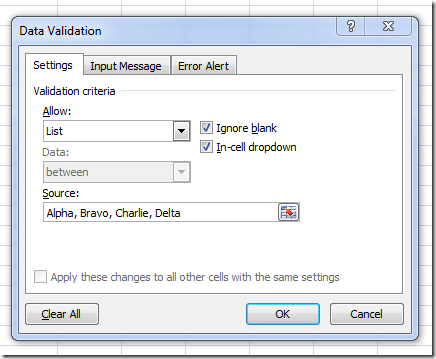
Turns out it’s not very complicated, as I just found out. Just create a Validation object, Add it to a Range, and you are good to go. Here is a code snippet to do just that, from a VSTO project:
var excel = Globals.ThisAddIn.Application;
var worksheet = (Worksheet)excel.ActiveSheet;

var list = new List<string>();
list.Add("Alpha");
list.Add("Bravo");
list.Add("Charlie");
list.Add("Delta");
list.Add("Echo");

var flatList = string.Join(",", list.ToArray());

var cell = (Range)worksheet.Cells[2, 2];
cell.Validation.Delete();
cell.Validation.Add(
   XlDVType.xlValidateList,
   XlDVAlertStyle.xlValidAlertInformation,
   XlFormatConditionOperator.xlBetween,
   flatList,
   Type.Missing);

cell.Validation.IgnoreBlank = true;
cell.Validation.InCellDropdown = true;
Nothing fancy, but as usual it took a bit of searching to figure out the right enumerations to use in the method call – hopefully it will be useful to someone else!
In the process, I found out two things. First, I wondered what would happen if I tried to set through code the contents of a cell to a value that isn’t valid. The answer is, Data Validation doesn’t validate anything in that case – it appears to be strictly a UI mechanism. Then, I realized that I had no clear idea what the 2nd and 3rd tab in the dialog do; turns out, these are potentially pretty cool. Input Message behaves like a ToolTip that shows up on cell selection, with a title and message, in a way similar to Comments, but not editable. Error Alert defines the message that should show up when an invalid value is entered – and allows to disable the Error Alert if need be. So if all you wanted was a DropDown with “suggested” choices, you could just disable the error alert, and you would have a cell with a DropDown, where users could still type any freeform text they please.
More...
16 Jan 2011
One of my favorite features in VSTO is the custom task pane. It provides a very natural and unobtrusive mechanism to expose your add-in functionality, fully integrated into Office, and makes it possible to use WPF for user interface development.

However, the Task Pane is not natively a WPF control. When you create your own Custom Task Pane, you pass it a good-old WinForms control, which will then be displayed in the Task Pane. You can then add two Russian dolls to the construction: an ElementHost control inside your WinForms control (found in the WPF Interoperability section of the ToolBox), and a WPF control inside the ElementHost. At that point, your TaskPane is WPF-ready, and you can happily begin adding shiny WPF controls to your Task Pane and forget about WinForms.
If you want your Task Pane to look seamless to your user, you will probably need to play a bit with Docking. If not, two specific issues could arise:
- Your WPF control is fairly small, and doesn’t take all the surface of the Task Pane, leaving the original WinForms color background visible in the uncovered areas,
- Your WPF control is too large for the Task Pane surface, leaving parts of the control invisible to the user, who cannot access them.
The first situation is mostly aesthetics (it just looks ugly), but the second case is a bit problematic, as it could make your Task Pane virtually unusable.
To illustrate the issue, let’s create an Excel 2007 Add-In project “AddInLab” in Visual Studio, add a WinForms control TaskPaneWpfHostControl, drop an ElementHost control in there, which we rename to wpfElementHost, instead of elementHost1, and set its Dock property to Fill so that it takes up the entire surface of the control. We’ll edit the code-behind, to provide access to the ElementHost via a public property:
namespace AddInLab
{
   using System.Windows.Forms;
   using System.Windows.Forms.Integration;

   public partial class TaskPaneWpfControlHost : UserControl
   {
      public TaskPaneWpfControlHost()
      {
         InitializeComponent();
      }

      public ElementHost WpfElementHost
      {
         get
         {
            return this.wpfElementHost;
         }
      }
   }
}
09 Jan 2011
As 2010 just closed, It’s time for a quick retrospective, looking at what went according to plan, and what could be improved upon in the year ahead.
-
The boat is still afloat, but, not surprisingly, this year has been a bit rougher than the previous ones financially. There isn’t much I can do regarding the economic downturn, but this was a reminder that diversification, aka “don’t put all your eggs in one basket”, is always a good idea. I haven’t quite gotten to my 2010 resolution of getting into products – in 2011, I will aim modestly for a revenue of at least $1 coming from product sales. It’s the first step that is difficult.
-
I spent some time this year learning F#; after 6 years or so writing exclusively C# code, this has been a great experience, and I am now sold on the Pragmatic Programmer advice to learn one language a year (still need to read that book). My F# skills are still mediocre at best, but it was a great introduction to functional concepts, and if anything, it had a direct impact in the quality of my C# code. Next in line: Python. Dynamic languages are another terra incognita for me, it’s time to give it a shot. The .NET community seems to be raving about Ruby these days, so why Python? Probably my contrarian streak – and also the fact that the Ruby community seems very focused on web development, which I am only moderately into, whereas Python and math often appear together.
-
I committed to write a post every week for 2010, and pretty much did it. While this isn’t always easy, I do enjoy the exercise of clarifying my thoughts and writing them down, and then think about the follow-up comments and questions. Keep them coming, you guys are great! Besides, I have a terrible memory, and this turns out to be a very useful repository of tricks and code snippets I can go back to later. Regularity definitely paid off in terms of traffic: my blog receives now over 2000 visits a week, from about 500 early in the beginning of the year. For the first time, it even brought me a client – it’s nice when a labor of love also pays off economically. Another lesson learnt was that website downtime is a killer: I have run into some issues with my web host during the last quarter, and at the same time, the nice pattern of weekly visits started to behave erratically, trending downwards. It could be that my blog content dried up, but I can’t help thinking that my hosting issues are to blame. Sorry for anyone who has been inconvenienced, and I’ll definitely keep a closer look in 2011!
-
I wrote quite a bit on VSTO, and became a Microsoft MVP for VSTO – definitely a highpoint of the year. I was honestly a bit surprised at the traffic I received around VSTO; nothing earth shattering, but it seems there is a demand for guidance on the general topic of Office automation and .NET. I’ll keep at it this year – and if you have specific requests, let me know in the comments and I’ll do my best to deliver.
- I wanted to improve my system architecture skills in 2010, and while I have learnt quite a bit, I am still nowhere close to where I want to be, so that will remain an area of focus for 2011. The details remain fuzzy (one thing I still enjoy about .NET is that there is always something new to learn), but I still want to dig into Azure, and get better with data.
-
It’s been a very fun year with the San Francisco .NET user group. I really wanted to keep quality speakers coming, and at the same time make it a more friendly place of discussion and exchange. Lighting talks, Nerd Dinners, drinks – we’ll have more on these in 2011. It takes a surprising amount of work to keep things running, but it’s been all worth it. Special thanks to Bruno Terkaly, Microsoft Evangelist extraordinaire, who has been incredibly supportive of the user group, and to all the volunteers and members who stepped up to help all year long (you know who you are!). I am really looking forward to 2011.
- I have been obsessing quite a bit about how to have the best of both worlds – a team of people with whom to discuss, from whom you expect ideas that are different from yours which are worth listening to, and independence. I still haven’t figured that one out; so far the only ways I see are getting a partner in Clear Lines, and/or setting up a collective/Guild of independent developers, something I like a lot on paper, but which would take a great amount of energy.
That’s it - I wish you all an amazing year 2011, packed with fun, success, and dreams fulfilled!
More...
26 Dec 2010
A little while ago, I looked into dynamically sorting a list, based on a criterion supplied by the user. There was one limit on the solution I presented, however: only one criterion could be applied at a time. What if we wanted to sort by multiple criteria?
For instance, using the same example as in the previous post, if we had a list of Products with a Name, a Supplier and a Price, how would we go about sorting by Supplier and then by Price? Or by Name and then Supplier? And how could we make that flexible, so that we can sort by an arbitrary number of criteria. This would be particularly useful if we had in mind the development of a user interface where users could select how they want to see a list of items displayed on screen.
Besides OrderBy, LINQ provides the [ThenBy](http://msdn.microsoft.com/en-us/library/bb534743.aspx)
<a href="http://msdn.microsoft.com/en-us/library/bb534743.aspx"> extension method. ThenBy is applied to an IOrderedEnumerable – a collection that has already been ordered – and sorts its, maintaining the existing order. For instance, in the following example, products are first sorted by Supplier, and for each Supplier, by Price:
private static void Main(string[] args)
{
   var apple = new Product() { Supplier = "Joe's Fruits", Name = "Apple", Price = 1.5 };
   var apricot = new Product() { Supplier = "Jack & Co", Name = "Apricot", Price = 2.5 };
   var banana = new Product() { Supplier = "Joe's Fruits", Name = "Banana", Price = 1.2 };
   var peach = new Product() { Supplier = "Jack & Co", Name = "Peach", Price = 1.5 };
   var pear = new Product() { Supplier = "Joe's Fruits", Name = "Pear", Price = 2 };

   var originalFruits = new List<Product>() { apple, apricot, banana, peach, pear };

   Func<Product, IComparable> sortByPrice = (product) => product.Price;
   Func<Product, IComparable> sortByName = (product) => product.Name;
   Func<Product, IComparable> sortBySupplier = (product) => product.Supplier;

   var sortedFruits = originalFruits
      .OrderBy(sortBySupplier)
      .ThenBy(sortByPrice);

   foreach (var fruit in sortedFruits)
   {
      Console.WriteLine(string.Format("{0} from {1} has a price of {2}.",
         fruit.Name,
         fruit.Supplier,
         fruit.Price));
   }

   Console.ReadLine();
}
12 Dec 2010
I recently began playing with ASP.NET MVC (never too late), and so far I really enjoy it. One aspect I really appreciate is its testability – I can write fairly straightforward unit tests to verify that the application behaves as I believe it should, as well as make sure I understand what is going on.
One point which got me stumped was how to test for authorization. A controller, or some of its methods, can be decorated with the attribute [Authorize], restricting users who can access the method by role or name. In the default ASP.NET MVC 2 template, when a user isn’t authorized to a specific area, he gets re-directed to the LogOn method on the AccountController. So far so good. However, I ran into unexpected issues when I attempted to unit test that. Suppose there are two roles in our web application, Chicken and Pigs, and that we have a Controller that leads to a pigs-only area of the web site:
[Authorize(Roles = "Pig")]
public class PigsOnlyController : Controller
{
   public ActionResult Index()
   {
      return View("Index");
   }
}
My first thought was to mock the ControllerContext and do something along these lines:
[Test]
public void OnlyPigsShouldAccessIndex()
{
   var context = new Mock<ControllerContext>();
   var userName = "PIG";
   context.SetupGet(p => p.HttpContext.User.Identity.Name).Returns(userName);
   context.SetupGet(p => p.HttpContext.Request.IsAuthenticated).Returns(true);
   context.Setup(p => p.HttpContext.User.IsInRole("Pig")).Returns(true);

   var controller = new PigsOnlyController();
   controller.ControllerContext = context.Object;

   // check what controller.Index() returns
}
However, while the web application itself behaved properly (Users in the Pig role get to the Index page, whereas Chicken get redirected to the Logon page), the test wasn’t doing what I expected: both Pigs and Chicken were happily reaching the Pigs-Only area.
As is often the case, I found out why on StackOverflow; the reason is that the re-direction is not the responsibility of the Controller. If the controller is properly decorated, the Index method won’t even be invoked, and where the call gets redirected to is handled in a different part.
So how do you unit test this behavior? In this case, we trust the framework to handle the redirection, so the only functionality we need to ascertain is that the Controller has the proper attribute.
Instead of validating the redirection, we can verify that the Controller class has an Authorize attribute, with the proper roles specified:
[Test]
public void ControllerShouldAuthorizePigsButNotChicken()
{
   var information = typeof(PigsOnlyController);
   var attributes = information.GetCustomAttributes(typeof(AuthorizeAttribute), false);
   Assert.AreEqual(1, attributes.Length);

   var authorization = attributes[0] as AuthorizeAttribute;
   var authorizedRoles = authorization.Roles;

   var roles = authorizedRoles.Split(',');
   Assert.IsTrue(roles.Contains("Pig"));
   Assert.IsFalse(roles.Contains("Chicken"));
}
I am not totally happy with the hard-coded strings “Pig” and “Chicken” in the test, but I don’t see a way around it; maybe it’s a sign that this test is more of an integration test than a unit test? If you know of a better way to test for that aspect, I am all ears!
More...