13 Aug 2010
Today is Friday the 13th, the day when more accidents happen because Paraskevidekatriaphobics are concerned about accidents. Or is it the day when less accidents take place, because people stay home to avoid accidents? Not altogether clear, it seems.
Whether safe or dangerous, how often do these Friday the 13th take place, exactly? Are there years without it, or with more than one? That’s a question which should have a clearer answer. Let’s try to figure out the probability to observe N such days in a year picked at random.
First, note that if you knew what the first day of that year was, you could easily verify if the 13th day for each month was indeed a Friday. Would that be sufficient? Not quite – you would also need to know whether the year was a leap year, these years which happen every 4 years and have an extra day, February the 29th.

Imagine that this year started a Monday. What would next year start with? If we are in a regular year, 365 days = 52 x 7 + 1; in other words, 52 weeks will elapse, the last day of the year will also be a Monday, and next year will start a Tuesday. If this is a leap year, next year will start on a Wednesday.
Why do I care? Because now we can show that every 28 years, the same cycle of Friday the 13th will take place again. Every four consecutive years, the start day shifts by 5 positions (3 “regular” years and one leap year), and because 5 and 7 have no common denominator, after 7 4-year periods, we will be back to starting an identical 28-years cycle, where each day of the week will appear 4 times as first day of the year.
More...
08 Aug 2010
I am currently on a project which involves creating a PowerPoint VSTO add-in. I have very limited experience with PowerPoint automation, so before committing to the project, I thought it would be a good idea to explore a bit the object model, to gauge how difficult things could get, and I set to write a small PowerPoint add-in which would automatically translate slides. Sounds like a simple enough project, how difficult could it be?
Turns out, not too difficult, but not completely trivial either. I discovered quickly that the PowerPoint object model, unlike most Office applications, doesn’t have much (any?) documentation for the .Net developer; the best I found is the VBA PowerPoint 2007 developer reference, which gives a decent starting point to figure out what the objects are about. So I thought I would share my exploration of the PowerPoint jungle, and hopefully spare some trouble to other .Net developers.
The plan
The objective is simple: write an add-in which allows the user to
- select a language to translate from, and a language to translate to,
- create a duplicate of the current slide, translating all the text and keeping the layout
The plan will be to use Google Translate to perform the translation. In order to do that, we will nedd to extract out all pieces of text that require translating.
Finding all the text in a slide
Lets’ start by identifying where we have text in the current slide. Let’s first create a PowerPoint 2007 Add-in project in Visual Studio. To keep things simple for now, we will add a Ribbon control with a button, and when that button is clicked, we’ll start working on the current slide:
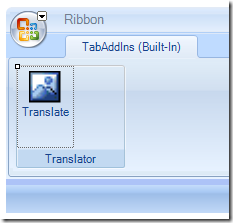
Double-click on the Button (I renamed my button translateButton) to generate an event handler for the Click event, and get the current Slide:
private void translateButton_Click(object sender, RibbonControlEventArgs e)
{
   var powerpoint = Globals.ThisAddIn.Application;
   if (powerpoint.ActivePresentation.Slides.Count > 0)
   {
      var slide = (PowerPoint.Slide)powerpoint.ActiveWindow.View.Slide as PowerPoint.Slide;
   }
}
24 Jul 2010
When I moved to California a few years back, I soon realized that to get anything done in the Silicon Valley, you pretty much have to have a car. So, I purchased my first car. Fast forward today: I live in San Francisco now, and noticed that I am driving less and less. Bicycle is very convenient in my neighborhood, and I don’t have to commute to work on a daily basis. Which got me thinking – do I really need a car? Public transportation only is not an option, because coverage is too spotty, but what about using a car sharing service?
The 2 major services available in my area are ZipCar and CityCarShare; their pricing system is largely similar: they both:
- charge by the hour of usage,
- charge a higher cost over the week-end,
- offer a discount for full-day rental,
- have a pay-as-you-go option, and better rates with minimum commitment plans.
Both include gas, with one difference: ZipCar charges by the hour, whereas CityCarShare has a hybrid pricing, with a lower per-hour cost, and a per-mile cost.
By contrast, when you own a car, you
- pay a large upfront investment (buying the car),
- recoup some of the upfront cost if you resell eventually.
- pay regular fixed costs (insurance, registration taxes, garage),
- pay by the mile (gas),
- pay some additional costs, like maintenance, which are somewhat linked to mileage.
In addition to that, you bear the risk that your car gets damaged or totaled in an accident.
More...
15 Jul 2010
Excel VSTO Add-In Series
Time to wrap this series on VSTO add-ins for Excel 2007. Now that we have a working application-level add-in, we want to deploy it on the user machine. There are two ways to do that: ClickOnce and Windows Installer. In this post, I will go over creating a basic installer using Windows installer with Visual Studio 2008. Very soon, we’ll have a VIP guest blogger who will tell you all you need to know about ClickOnce deployment and VSTO.
This post borrows heavily from the Microsoft white paper linked below, which is absolutely excellent. I mostly paraphrased it, focusing on the how and not the why. I strongly encourage you to go to the source and read it for more details:Deploying a VSTO 3.0 Solution for Office 2007 System Using Windows Installer.
The white paper comes with sample code, covering a few scenarios: VSTO installer sample code
Note: the following applies to Office 2007 projects. If your add-in needs to run on Excel 2003, you should follow this guidance instead: Deploying VSTO Solutions Using Windows Installer (Part 2 of 2)
Surgeon General Warning: prolonged reading of material pertaining to msi deployment can cause drowsiness or confusion; absolutely no risk whatsoever of euphoria is to be expected.
This post is not going to be sexy. My goal is to have a check-list of what to do to get your add-in to install correctly. The steps require no thinking, and are frankly rather boring. I find some steps pretty obscure, and recommend patience and soothing music; you may consider also having some sacrificial offering ready to appease the Great Installer Voodoo deity (a nice chicken will usually do).
Prepare the add-in
We will start from where we left off, with a working add-in (download the add-in here). Let’s first fill in the fields describing our assembly, by right-clicking on the project:
ClearLines.Anakin > Properties > Application > Assembly information:
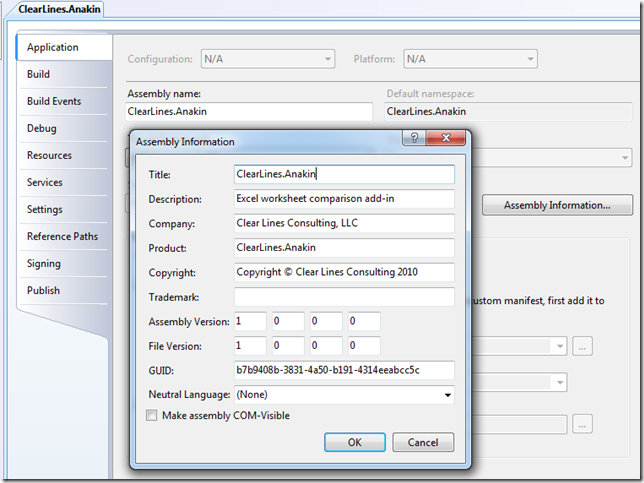
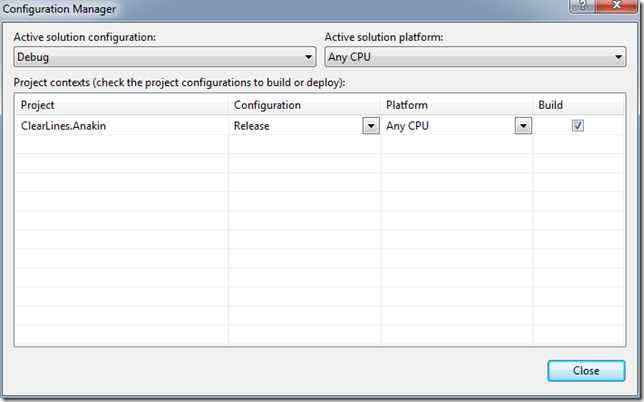
Next, let’s set the configuration to Release, so that we feed the optimized release version to the installer. Right-click on the Solution (not the add-in project), select Configuration Manager, and set ClearLines.Anakin to Release instead of Debug.
More...
13 Jul 2010
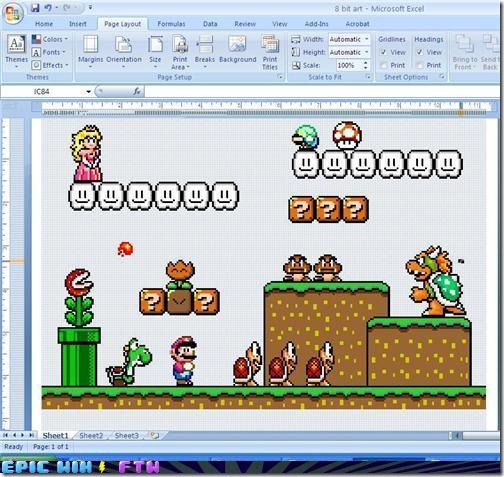
Found on Epic Win FTW – The Sparklines of Excel 2010 are cool, but this is an Epic Win indeed. Pretty amazing, and another shining example of how Excel is used for lots of purposes, some of them probably never considered by Microsoft :)
More...