Today I came across a post which demonstrates how to use Goal Seek to determine how to save for your retirement. Goal Seek is essentially a simplified solver: point Goal Seek at a cell, tell it how much you want it to be and what cells it can tinker with, and Goal Seek will try to find values that reach that goal. The post is an excellent illustration of what’s great about it: it’s super easy to use, and very practical.
However, there is no such thing as a perfect tool, and Goal Seek can fail miserably at finding the optimal answer to very simple problems. After reading this, I thought it would be a good public service to illustrate what its shortcomings are, especially if you are going to trust it for questions as important as your retirement!
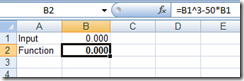
For our illustration, we will use the following setup.
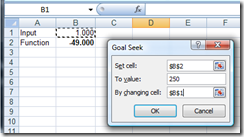
Now let’s say we want to find a value such that B2 = 250. Following Pointy Haired Dilbert, let’s use Goal Seek:
Put in a value of 1 in cell B1, and run Goal Seek - here is what happens:
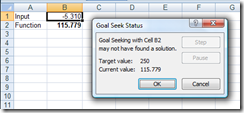
Goal Seek fails to find a value in B1 such that B2 = 250. Complete failure.
I really like the addition of [TestCase] in NUnit 2.5. A significant part of the code I write is math or finance oriented, and I find Data-Driven tests more convenient that “classic” unit tests to validate numeric procedures.
However, I got a bit frustrated today, because of the lack of tolerance mechanism in data-driven tests. Tolerance allows you to specify a margin of error (delta) on your test, and is supported in classic asserts:
You can specify how close the result should be from the expected test result, here +/- 0.01.
I came into some rounding problems with data driven tests today, and hoped I would be able to resolve them with the same mechanism. Here is roughly the situation:
Of course, this works – but this is clumsy. I was really hoping that TestCase would support the same functionality as Assert, with a built-in delta tolerance. It seems particularly relevant: rounding error issues are typical in numerical procedures, a field where data-driven tests are especially adapted.
Maybe the feature exists, but is undocumented. If you know how to do this, sharing your wisdom will earn you a large serving of gratitude, and if it the feature doesn’t exist yet… maybe in NUnit 2.5.1?
While shopping at PetCo the other day, I saw this scene, and couldn’t get enough of it. It’s a great illustration of what happens when teamwork goes wrong. If I saw this in real life, I would feel sorry for the team, but the mice don’t seem to be suffering (besides some confusion), so sit back and enjoy the show, guilt-free.
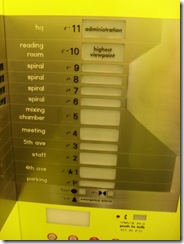
Why did I take it? Because I thought the design was interesting. The typical elevator button panels has a series of buttons, each of them the same size, ordered with the corresponding floor elevation. This panel has buttons of various sizes, and given what I saw in the building, I guess the size corresponds to the frequentation of each floor, or, if you prefer, the relative likelihood that you want to go to each floor.
In my opinion, there are some flaws in the design (for instance, the buttons are very far from the labels saying what is on the floor, which slows down figuring out which button you really want to push), but I thought the idea of various button sizes was smart, and bizarrely under-utilized in computer user interfaces. If you are going to expose different functionalities to your user, chances are, some will be used more often than others, and giving them a larger button should make the user’s navigation easier.
I found an example of this on Netflix’s website, for instance:
Note how the 2 right-most elements of the tab are smaller than the rest? So why is this design style rare? I guess it has to do with the fact that regularity looks good, without much effort. Give your buttons the same size and font, and everything looks organized, and easy on the eye. Once you start playing with elements of various sizes, it is much harder to achieve balance and cohesion. Usability might be improved, but chances are, you will need someone with a sense of visual design to help you make it look good – whereas even the most lacking in aesthetic sense can align buttons.
Very interesting piece by Martin Fowler; he discusses spreadsheets as a programming language, and coins the term “Illustrative Programming” to describe the corresponding development style. I quote liberally here:
One property of spreadsheets, that I think is important, is its ability to fuse the execution of the program together with its definition. When you look at a spreadsheet, the formulae of the spreadsheet are not immediately apparent, instead what you see is the calculated numbers - an illustration of what the program does. Using examples as a first class element of a programming environment crops up in other places - UI designers also have this. Providing a concrete illustration of the program output helps people understand what the program definition does, so they can more easily reason about behavior.
I don’t think that illustrative programming is all goodness. One problem I’ve seen with spreadsheets and with GUI designers is that they do a good job of revealing what a program does, but de-emphasizes program structure. As a result complicated spreadsheets and UI panels are often difficult to understand and modify. They are often riven with uncontrolled copy-and-paste programming. This strikes me as a consequence of the fact that the program is de-emphasized in favor of the illustrations. As a result the programmers don’t think to take care of it. We suffer enough from a lack of care of programs even in regular programming, so it’s hardly shocking that this occurs with illustrative programs written by lay programmers. But this problem leads us to create programs that quickly become unmaintainable as they grow.
This piece is worth reading, if only to see such a highly respected developer as Fowler defend Excel as a programming language. Given how Excel is usually dissed by “serious programmers”, it’s refreshing.
His analysis rings true, too – spreadsheets and UI tools are very similar in their benefits (immediate focus on the end result desired by the user) and drawbacks (possible lack of structure, lack of testability…). I am not sure how to describe the “other” style, maybe “Axiomatic Programming” - first establish the principles, then useful consequences can be derived? In a way, the term “Illustrative Programming” marks one extreme on the scale of development styles: don’t program if you can’t see it – whereas the other extreme would be developing a framework– creating programs which can’t be seen until someone decides to illustrate its use.
Another way to view the trade-off is to see Illustrative Programming as focused on a specific instance, whereas Axiomatic Programming emphasized the Class. An Excel speadsheet, or a User Interface, is typically one isolated instance, focused on one unique particular illustration of a problem, and as a result, doesn’t promote thinking about generalization and abstraction, whereas the risk in framework design is to embrace generality to the point where abstractions lose connection to specific usage…