16 Apr 2011
In my last post, I looked into running a simple simulation using F# sequences; our model mapped a sequence of random numbers to 2 states, Rainy and Sunny. What if we wanted to model something a bit more realistic, like a system where the weather tomorrow depends on the weather today? Let’s say, for instance, that if the weather is Sunny today, there is a 60% chance that it’s still Sunny tomorrow, but if it’s Rainy today, we have a 70% chance that tomorrow is Rainy.
Technicality: we will also assume that if we know today’s weather, what happened yesterday brings us no additional information on the probability of rain or sun tomorrow.
Let’s start like last time, and define first a Weather type, with 2 states, Rainy and Sunny, and represent the transitions from state to state, using pattern matching:
type Weather = Sunny | Rainy

let NextDay today proba =
    match today with
    | Rainy -> if proba < 0.7 then Rainy else Sunny
    | Sunny -> if proba < 0.6 then Sunny else Rainy
Armed with this, starting from an initial state, we want to generate the next state, based on the current state and the next probability coming from the sequence of random numbers. This part got me stumped for a while. Using a Sequence map is clearly not going to work, because, unlike in the previous post, we can’t determine the Weather based on the probability alone, we need both the probability and the previous Weather. Conversely, Sequence unfold has the opposite problem: it generates a sequence of states based on the previous State, but doesn’t take in another Sequence as input.
More...
10 Apr 2011
One of my initial goals for 2011 was to get my feet wet with Python, but after the last (and excellent) San Francisco F# user group meetup, dedicated to F# for Python developers, I got all excited about F# again, and dug back my copy of Programming F#.
The book contains a Sequence example which I found inspiring:
open System

let RandomSequence =
  let random = new Random()
  seq {
    while true do
    yield random.NextDouble() }
What’s nice about this is that it is a lazy sequence; each element of the Sequence will be pulled in memory “on demand”, which makes it possible to work with Sequences of arbitrary length without running into memory limitation issues.

This formulation looks a lot like a simulation, so I thought I would explore that direction. What about modeling the weather, in a fictional country where 60% of the days are Sunny, and the others Rainy?
Keeping our weather model super-simple, we could do something along these lines: we define a Weather type, which can be either Sunny or Rainy, and a function WeatherToday, which given a probability, returns the adequate Weather.
type Weather = Sunny | Rainy

let WeatherToday probability =
  if probability < 0.6 then Sunny
  else Rainy
13 Mar 2011
I had heard good things about OpenXML, but until now I didn’t have time to give it a try. After attending a rather intimate session on the topic at the MVP Summit, I realized I should look into it. For those of you like me who haven’t kept up with the news, the general idea is that, since the release of Office 2007, Office files are no longer saved as obscure proprietary files: they are essentially zipped xml files. If you rename an Excel file from MyFile.xlsx to MyFile.zip and open it, you will see that it is simply a collection of xml files, describing the various parts of your Workbook and their relationships. This has a few interesting implications, one of them being that you can create or edit an Excel file without using Excel, or even having Excel installed on your machine.
The OpenXML SDK is a free library which provides strongly typed .NET classes to manipulate these files without having to deal with raw XML, and are LINQ-friendly, which is awesome.
One scenario where this comes very handy is if you have some form of a .NET application which needs to read input data from an Excel file; another interesting case is a .NET application which needs to produce some Office outputs for the user. Rather than launch an instance of the Office application and use the COM Interop, you can perform all these tasks safely in .NET, without having to worry about cleanly closing the application.
In line with the first scenario, my initial goal was to see if I could read the contents of an Excel Workbook with a console app. Rather than going into lengthy explanations, here is the code I ended up with, which borrows heavily from the samples provided with the SDK:
namespace OpenXmlApp
{
   using System;
   using System.Collections.Generic;
   using System.Linq;
   using DocumentFormat.OpenXml;
   using DocumentFormat.OpenXml.Packaging;
   using DocumentFormat.OpenXml.Spreadsheet;

   public static class Program
   {
      private static void Main(string[] args)
      {
         var filePath = @"C:/Tests/protectedFile.xlsx";
         using (var document = SpreadsheetDocument.Open(filePath, false))
         {
            var workbookPart = document.WorkbookPart;
            var workbook = workbookPart.Workbook;

            var sheets = workbook.Descendants<Sheet>();
            foreach (var sheet in sheets)
            {
               var worksheetPart = (WorksheetPart)workbookPart.GetPartById(sheet.Id);
               var sharedStringPart = workbookPart.SharedStringTablePart;
               var values = sharedStringPart.SharedStringTable.Elements<SharedStringItem>().ToArray();

               var cells = worksheetPart.Worksheet.Descendants<Cell>();
               foreach (var cell in cells)
               {
                  Console.WriteLine(cell.CellReference);
                  // The cells contains a string input that is not a formula
                  if (cell.DataType != null && cell.DataType.Value == CellValues.SharedString)
                  {
                     var index = int.Parse(cell.CellValue.Text);
                     var value = values[index].InnerText;
                     Console.WriteLine(value);
                  }
                  else
                  {
                     Console.WriteLine(cell.CellValue.Text);
                  }

                  if (cell.CellFormula != null)
                  {
                     Console.WriteLine(cell.CellFormula.Text);
                  }
               }
            }
         }

         Console.ReadLine();
      }
   }
}
A few comments:
-
I am opening the document as read-only, setting the second argument to false.
-
workbook.Descendants<Sheet>() returns an IEnumerable<Sheet>, which means that you can now query it using Linq if you please.
-
I am still wrapping my head around the organization of elements. Coming from “classic” Excel, I expect to be able to navigate down directly from a Workbook into its Worksheets; here, the Sheet contained in the Workbook is merely a key which indicates what sheets exist, and what Id to use when requesting them. Navigating between the parts of the file will take a bit of getting used to.
-
I love the fact that you can directly iterate over the Cells of a Worksheet. The cells variable above retrieves only cells that have some content, and nothing more. No need to read cells into 2-d arrays and iterating over all of them.
-
On the other hand, I found the organization of the cells content a bit disorienting at first. Interestingly, cells that contain strings that are not formulas do not store the value in the cell element itself. They are stored in a SharedStringTable, and the cell contains an index, in Cell.CellValue.Text, which indicates which element of that table it contains. This seems to be true only for strings that are not formulas, however: if the cell contains a formula, or some non-string type, then the content is stored in CellValue.Text, and there is no record in SharedStringTable. I am sure this will make sense to me some day.
-
I am interested to see how easy or painful it is to work with Cells addressed by their index (as in, Cells[3,2] ). This is fairly straightforward using the Interop, but from what I have seen so far, I expect it will be a bit more involved here, because that’s just not how the data is organized.
In short, I found the SDK pleasant to install and use so far (and well documented), and I can definitely see scenarios where I will be using it in the future. On the other hand, I suspect I will end up writing quite a few helper methods to make it more usable – probably trying to make it look closer to the classic Interop. I suspect also that it will turn out to be better suited for applications like Word and PowerPoint, because of the more hierarchical nature of their content.
More...
20 Feb 2011
While browsing the ListObject documentation today, I realized that, while all the examples given focused on binding to a DataSet, it also supports databinding to “any component that implements the IList interface”. This is something I wasn’t aware of, so I figured I would give it a try.
I quickly created a Excel 2007 Template project in VS2010, and added a simple Product class as follow:
public class Product
{
   public string Name { get; set; }
   public double Price { get; set; }
}
I then added the following code behind Sheet1, creating a straightforward list of Product, as well as a ListObject, setting the DataSource to the list:
public partial class Sheet1
{
   private List<Product> products;
   private ListObject listObject;

   private void Sheet1_Startup(object sender, System.EventArgs e)
   {
      this.listObject = this.Controls.AddListObject(this.Range["B2"], "Products");

      this.products = new List<Product>();
      this.products.Add(new Product() { Name = "Alpha", Price = 10d });
      this.products.Add(new Product() { Name = "Bravo", Price = 20d });
      this.products.Add(new Product() { Name = "Charlie", Price = 30d });

      this.listObject.DataSource = products;
      this.listObject.AutoSetDataBoundColumnHeaders = true;
   }
   // auto-generated code omitted
}
Hit F5, and watch:
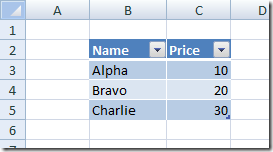
Out of the box, we get a nicely formatted list, with filters in the headers. If anything, that’s a convenient way to display a list of items on a Worksheet. I didn’t have time to dig deeper into it, but I am now very curious about how much more can be done with this mechanism. Can I add data validation? Can I control what properties to display?
More...
13 Feb 2011
I have been a fan of Test-Driven Development for a long time; it has helped me write better code and keep my sanity more than once. However, until now, I haven’t really looked into Behavior-Driven Development, even though I have often heard it described as a natural next step from TDD. A recent piece in MSDN Magazine re-ignited my interest, and helped me figure out one point I had misunderstood, namely how BDD and TDD fit together, so I started looking into existing frameworks.
Most of them follow a similar approach: write in a plain-text file a description of the feature in Gherkin, a “feature description” language that is human readable, let the framework generate test stubs which map to the story, and progressively fill the stubs as the feature gets implemented.
I am probably (too) used to writing tests as code, but something about the idea of starting from text files just doesn’t feel right to me. I understand the appeal of Gherkin as a platform-independent specification language, and of letting the product owner write specifications – but the thought of having to maintain two sets of files (the features and the actual tests) worries me. I may warm up to it in due time, but in the meanwhile I came across StoryQ, a framework which felt much easier to adopt for me.
StoryQ is a tiny dll, which permits to write stories as tests in C#, using a fluent interface, with all the comfort and safety of strong typing and intellisense; Gherkin stories can be produced as an output of the tests, and a separate utility allows you to create code templates from Gherkin.
Rather than talk about it, let’s see a quick code example. I have a regular NUnit TestFixture with one Test, which represents a Story I am interested in: when I pay the check at the restaurant, I need to add a tip to the check. There are 2 scenarios I am interested in: when I am happy, I’ll tip a nice 20%, but when I am not, there will be zero tip. This is how it could look like in StoryQ:
using NUnit.Framework;
using StoryQ;

[TestFixture]
public class CalculateTip
{
   [Test]
   public void CalculatingTheTip()
   {
      new Story("Calculating the Tip")
      .InOrderTo("Pay the check")
      .AsA("Customer")
      .IWant("Add tip to check")

      .WithScenario("Unhappy with service")
      .Given(CheckTotalIs, 100d)
      .When(IAmHappyWithService, false)
      .Then(TipShouldBe, 0d)

      .WithScenario("Happy with service")
      .Given(CheckTotalIs, 100d)
      .When(IAmHappyWithService, true)
      .Then(TipShouldBe, 20d)

      .Execute();
   }

   public double CheckTotal { get; set; }

   public bool IsHappy { get; set; }

   public void CheckTotalIs(double total)
   {
      this.CheckTotal = total;
   }

   public void IAmHappyWithService(bool isHappy)
   {
      this.IsHappy = isHappy;
   }

   public void TipShouldBe(double expectedTip)
   {
      var tip = TipCalculator.Tip(CheckTotal, IsHappy);
      Assert.AreEqual(expectedTip, tip);
   }
}
(The TipCalculator class is a simple class I implemented on the side).
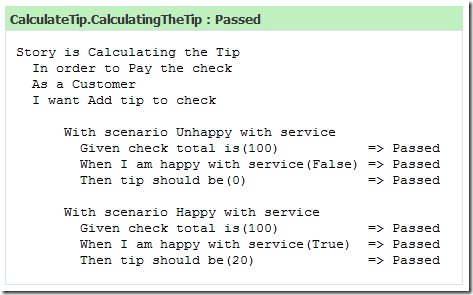
This test can now be run just like any other NUnit test; when I ran this with ReSharper within Visual Studio, I immediately saw the output below. Pretty nice, I say.
What I liked so far
-
Painless transition for someone used to TDD. For someone like me, who is used to write unit tests within Visual Studio, this is completely straightforward. No new language to learn, a process pretty similar to what I am used to – a breeze.
-
Completely smooth integration with NUnit and ReSharper: no plugin to install, no tweaks, it just worked.
-
Fluent interface: the fluent interface provides guidance as you write the story, and hints at what steps are expected next.
-
Passing arguments: I like the API for expressing the Given/When/Then steps. Passing arguments feels very natural.
-
xml report: I have not played much with it yet, but there is an option to produce an xml file with the results of the tests, which should work well with a continuous integration server.
What I didn’t like that much
-
Execute: at some point I inadvertently deleted the .Execute() call at the end of the Story, and it took me a while to figure out why all my tests were passing, but no output was produced. More generally, I would have preferred something like Verify(), which seems clearer, but that’s nitpicking.
-
Multiple scenarios in one test: once I figured out that I could chain multiple scenarios in one story, I was a happy camper, but all the examples I saw on the project page have one story / one scenario per test method. It’s only when I used the WPF story converter that I realized I could do this.
-
Crash of the WPF converter: the converter is awesome – but the first time I ran it it crashed.
So where do I go from there? So far, I really enjoyed playing with StoryQ – enough that I want to give it a go on a real project. I expect that the path to getting comfortable with BDD will be similar to TDD: writing lots of tests, some of them fairly bad, until over time a certain feeling for what’s right or very wrong develops… In spite of my reservations, I am skeptical but curious (after all, I have been known to be wrong sometimes…), so I also plan to give SpecFlow a try.
More...