09 Aug 2009
The first of Scott Hanselman’s “Top 10 Tips Working Developers Should Know about Windows 7” really made my day: Win 7 includes .NET 3.5 SP1. This probably doesn’t matter to you if you are not a .NET developer, but if you are, chances are you have had the same frustration as I did. .NET 3.5 SP1 is really what you want to be developing against, because it includes so much goodness, but in my experience, most users don’t have it on their machines. As a result, your potential user has to go through a good 15 minutes of download and a reboot – and that’s assuming the IT department is fine with that, which is not a given (personal experience).
This is of particular importance to me, because my pet project Akin, a free application that helps track down differences between Excel files, is written against .NET 3.5. I really needed WPF to create the kind of user interface I wanted, but this has proven a hurdle in getting people to try it out. You might be able to convince people you know personally that they should install .NET 3.5, but for the casual visitor who stumbles across a webpage and wants to just try out an application, asking them to download a giant file for unclear purposes first is just a killer. You lost one potential user, right there. With Windows 7 pre-sales making a solid start, hopefully I will be relieved of that issue. This is very motivating – time to get back to it, and implement some of the great suggestions I received so far!
More...
09 Aug 2009
Today I came across a solution to Euler Problem 205 on The Daily Dose of Excel. The problem is stated as follows:
Peter has nine four-sided (pyramidal) dice, each with faces numbered 1, 2, 3, 4. Colin has six six-sided (cubic) dice, each with faces numbered 1, 2, 3, 4, 5, 6. Peter and Colin roll their dice and compare totals: the highest total wins. The result is a draw if the totals are equal.
What is the probability that Pyramidal Pete beats Cubic Colin? Give your answer rounded to seven decimal places in the form 0.abcdefg
I thought it was a pretty cool problem; I love probability problems, and had never come across something similar, so it piqued my interest. The solution presented in The Daily Dose was essentially a pretty efficient brute-force enumeration, and I wondered if it was possible to go a bit faster that 6 minutes follow a different approach – using my language of predilection, C#.
[Edited August 9. Note to self: before commenting on other people’s blog posts, I should make sure I read them properly. Especially when discussing their code’s performance. Otherwise, I will look foolish].
The probability that Pete wins can be written as:

Refreshing a bit my memory in probability through Wikipedia, “the exact probability distribution Fs,i of a sum of i s-sided dice can be calculated as the repeated convolution of the single-die probability distribution with itself” as follows:

More...
03 Aug 2009
I just completed a fun project a few days ago, a C# application which performed lots of reading from and writing to Excel. One small problem got me stumped: I know how to add a standard chart, but I couldn’t figure out how to add charts from the Custom Types selection. Most of these are utterly useless (There is an “Outdoors Bar” type, which is “A bar chart with an outdoor look”. I am not making this up.), except for one: the “Line – Column” chart type, and its variations on 2 axes.
 I like Outdoorsy charts
The VBA macro recorder spat out this:
ActiveChart.ApplyCustomType ChartType:=xlBuiltIn, TypeName:="Line - Column"
So I check the Chart object in C# and sure enough it has a method ApplyCustomType(Excel.XlChartType CharType, object TypeName). Problem: the enumeration Excel.XlChartType does not contain anything like XlBuiltIn. Damn.
Long story short: xlBuiltIn is to be found in the enum XlChartGallery, and the type name is passed as a good old magic string. This code does the job:
Edit, August 20, 2009: this code works for Excel 2003, but not for Excel 2007. Check this post for an updated version of the code which follows the suggestion of Jon Peltier, Master of Charts.
// create your chart first
string builtInType = "Line - Column";
Excel.XlChartType customChartType = (XlChartType)XlChartGallery.xlBuiltIn;
chart.ApplyCustomType(customChartType, builtInType);
01 Aug 2009
I have been slammed with work lately, and couldn’t find the time to do this, even though I have wanted to for a while. Well, it’s done – this blog now runs on BlogEngine.Net 1.5.1.14! One of the reasons I wanted to give it a try is the multiple-widget zone feature, which is unfortunately not yet in the 1.5 “official” release, so I went the adventurous route, and here we are! I still need to do some minor polishing on the styling in the next few days, but so far, everything looks like it’s running smoothly.
More...
01 Aug 2009
Even though I develop with WPF, I haven’t really used Blend so far: as of now, I am simply more comfortable working directly with xaml in Visual Studio. However, I was intrigued when I recently heard that the upcoming Microsoft Blend 3 version came with Sketchflow, a UI prototyping tool, so I downloaded the trial version and gave it a quick spin.
I spent about one hour playing with it, barely enough to give it justice (especially so when you practice the mantra “user manuals and tutorial are for wimps”), but I really liked what I saw. Sketchflow allows you to
- Rapidly design screens using Blend, adding real WPF control and defining the flow between screens based on user actions on the controls
- Build the prototype so that another person can run it and experience interacting with the application,
- Collect feedback on the prototype.
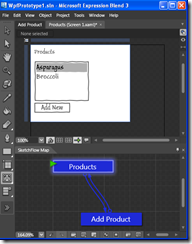
I created a simple application, where a user can view a list of products, and add new products. This is how Sketchflow looks: the top part displays your screen, the bottom the flow between the existing screens. To edit your prototype, you simply add and format controls, and define which screen they lead to if need be.
More...